Showing posts with label brainstorm. Show all posts

If Wine installers can look fancy, why not .debs?

View Comments

Y’know, now that Windows executables look all fancy with the latest Wine - making use of the inbuilt application icons - I can’t help but think that they make Ubuntu look worse. Why? Here goes…

Dreary .Deb’s

Just look at native .deb installers in comparison - they look so bland and uniform and indistinct.

George Dumitrescu e-mailed us to not only point out the lack of visual intuitiveness but to ask why they have to be like this when they could be much more akin to this: -

Whilst your Joe Average user shouldn’t need to be exposed to .deb installers in the first place (that’s what the Software Centre & PPA’s are for, non?) there are situations where he will either need to use one or prefer to use one. Coupled with this are the relative pain-free installation .deb’s provide and it’s easy to see why they are one of a users preferred options.

In a folder full of downloaded .deb packages Joe Average has to read and/or search for the application packages’ name. In Windows he’d just need to visually scan for the application icon.

George puts this succinctly: “It's a big deal. I mean if my sister downloads an deb from the web something like flash player and opens the download directory, will be able to find it instantly without confusing it with an archive.”

Why is it like this?

First up lets note that not every .deb package is an applications. In fact most aren’t. George suggests that such non-app installers could be displayed with an ‘extension’ type icon to denote that it is a library/etc: -installers-mockup2There are, no doubt, also technical considerations preventing .deb’s from displaying icons. A .deb would somehow need to announced whether it was a library, codec, etc or an application and that, one assumes, would require some extra work; this isn’t an idea that could be implemented over night or surely it would have been already. In a simplistic frame of mind you can help but think that given the .deb of an application contains an application icon is there surely no way to draw on this?

Mock-ups by George

Continue reading

An Application Ballot Screen For Ubuntu? Oh Jeez...

View Comments
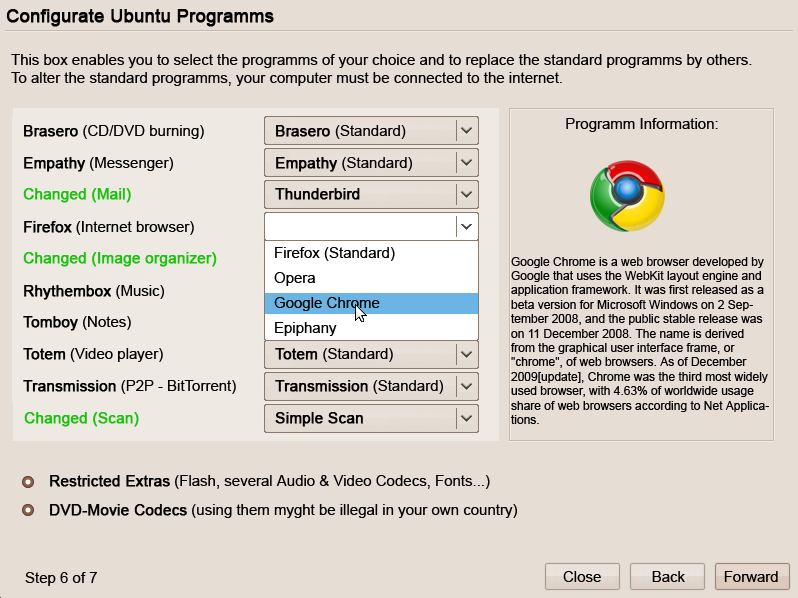
The following idea, proposed on Ubuntu Brainstorm, puts forward the sugeestion that users should be allowed to configure the application set before installation. Sort of like the Windows Browser ballot but for, well, pretty much everything.
Mock-up of proposed 'ballot' screen; click to view larger
Great intention but wrong idea? I can't imagine what a plain Jane No-name would do when confronted with a screen like the mock-up above. The majority of non-geeks can't tell a web browser from a office suite without some clarification let alone having to pick from the veritable cor-don-bleu app menu above! Others, perhaps already daunted by the prospect of switching OS, may feel even less assured with their decision when given a screen with row-after-row of drop boxes and options; coming from the comparatively pampered land of Windows or OS X to a decision-minefield as proposed would be hell for the newbies i know. They don't want choices before they begin they just want something that works! The 'easy-switch app' selection screen is a great idea but i don't feel its best presented to nervous newbies before they've even got to the partition editing screen. Instead i think it would work extremely well as an application - sort of like a 'preferred applications' menu on steroids and with one-click install alternatives. Now that would be newbie friendly. Regardless, here's the vote link: -

Continue reading

Brainstorm: Make Setting Up GMail In Evolution Simple!

View Comments
Evolution is a mature, well featured and tightly integrated E-Mail client in Gnome. It's no suprise that it's kept as default in Ubuntu, too.

Sadly Evolution can come across as a bit complex for first time users or those who simply want to read their webmail in a desktop app. After all, the majority of Ubuntu users are home users and don't need/understand/want/have corporate e-mail accounts and the what not. They just want to enter their Gmail account info and get their mail.

If you want to sync your Google Calendar, contacts and notes as well then it's an even more elaborate process for poor ol' Grandma and Grandpa.

A month or so back i blogged about Spicebird - a Mozilla Thunderbird based E-Mail client that is, quite literally, all manner of awesome for GMail users. You enter your Gmail Username and Password, check what you want to sync and that's it. It takes the same amount of time as to type your username in.

Evolution - not so easy.

Shady3D submitted a 'brainstorm' over on Ubuntu Brainstorm proposing that this be addressed.

Rationale
" [sic] setting-up Gmail in Evolution every time is a hell for non geeks. calendar, address-book, and notes are a completely different thing."

Agree? Disagree? Be sure to vote! 

Continue reading

Make Nautilus more Helpful

View Comments

It’s that time of the, er… sometime, where i cast my beady eye over the suggestions and ideas over at Ubuntu Brainstorm and either agree that an idea is the single greatest suggestion since someone mentioned “Gnome” and “Do” in the same sentence, or deride it as the most ridiculous proposal since the invention of Ekiga! (Sorry, Ekiga.)

This week it’s the turn of l3on’s suggestion that Nautilus could be a bit more helpful…

THAT MAKES SENSE!

l3on proposes that Nautilus’ “information” side-pane should also display file information that is found in the “properties” menu.

Some screenshots would better demonstrate this: -

Currently: -

nautilus

Proposed: -

nautilus-info

Klau3, whilst agreeing the side-pane should display some information, thinks it should only display relevant stats that the user would be interested in: -

 nautilus-information-sidebar

I think this is a great idea. It’d probably mean i actually USED the information panel for starters, but it’s almost incredulous that the so-called information panel isn’t actually currently displaying much in the way of it’s title!

Agree? Disagree? VOTE!


Continue reading

Should Ubuntu “Software-Store” Be Renamed?

View Comments

Ubuntu Karmic Koala will see the first step of the much heralded package-management replacement named “Software Store” – whose name has caused a lot of controversy within the Ubuntu Community.

What’s in a name?

The development name for what we now know as the Ubuntu SoftwareStore was simply “AppCentre” – a name that was simple and self explanatory, but not “official”.

Upon the official naming of AppCentre to “SoftwareStore”, many users were left feeling muddled due to the term “store” having commercial associations. This fact is exemplified by the fact that, indeed, developers will be allowed to sell (as in for money) applications within the new framework by Ubuntu 11.04.

Of course, there is nothing wrong with the option to do this, and any paid application will face a tough time when up against free and just-as-capable application of the same ilk. Yet some feel it will distort the user experience of Ubuntu – and perhaps lead open-source dev’s away into solely “paid” development.

For many of those left hurt by the new name, it’s purely because Software Store sounds so blatantly commercial; a name that promotes the “paid” side more than the “free” side.

If you don’t like the name you can register you vote over at Ubuntu Brainstorm – where votes = change.

[Pssst! I think it should be renamed OMG! APPS!]

[</joke>]

Continue reading

"Clever Windows" - Better than Gnome 3?

View Comments

Gnome3 - aka 'Gnome Shell' - has been met with a mirth of derision within the Linux community for various reasons. Some don't like progress, some don't like the way it handles windows and some don't like it's emphasis on more symantic use of search for both online data and stuff on the file-system. Some just hate it because, well, they're bored!

self

Below is a brainstorm idea by Gnome-Look user Crantisz and its presents an intriguing, and delicious, concept for managing windows that doesn't stray too far from the current way of managing windows, but also has a great wedge of new and intuitive ideas in it to appease others.

Continue reading

OMG! IRC!

OMG! IRC!
 

Popular Threads

Powered by Disqus

Designed on

Blog Archive

Recent Comments

© Ohso 2010 All rights reserved | Site designed by Jeff V and TSM1428. Created by d0od | Back To Top