
It's an icon with cash in it.
 Brilliant.


 |
| Lucid Lynx |
 |
| Karmic Koala |

We’re big fans of the Ubuntu Software Centre and avidly follow its continued visual evolution. When a reader dropped by the OMG! Inbox to tip us off to ‘the most awesome software centre mock-ups you will have ever seen!’ I'll admit my interest was more than a little caught…
The design, created by ‘Daniel’ and posted on the Ubuntu Meerkat Wiki for feedback, revolves around revamping the current Software Centre UI into an all-singing, all-dancing cartoon-like literal “store” style concept akin to the Android Market UI, the iPad eBook UI & and similar.
And no, before you spit your cornflakes out all over your very clean keyboard, this is not an official design and nor is it likely to come to frutition. It was posted by it’s creator to stir some debate around what the USC should look like - not what is is going to look like.
Capiche? Onwards we go…
“…the Software Center is still more difficult to use than it could be.” reasons the designer. “It should ensure that users don't get lost in a sea of applications, and that they can find the best applications available for Ubuntu.”
Most followers of OMG! will be aware that the majority of these points are moot.
The Canonical design and DX team have been super hard at work refining the official Software Centre vision. On course for Ubuntu 10.10 is support for ‘new applications’ added and promoted after release, improved UI, social support for sharing app suggestions, apt-link handling and, fingers crossed, user-contributable ratings support.
This proposed design, whilst contemporary looking today, would soon look out of date and old hat were Apple or Android to change their designs.
The ‘large’ icon idea has merit to an extent but for a first-time visitor to the store the sight of 12 different indistinctive application icons wouldn’t do much to inform or assist. Some great applications have very mundane icons so in the identity-parade proposed some users may end up with an inferior app based solely on the amount of gloss effect baked into a .png….
To juxtapose just how far the software store has come in a year - and to iterate that the design is still to be built upon over future releases - here is the Software Centre Version as seen in Karmic and, most recently, in Ubuntu 10.10 Maverick Meerkat Alpha 2: -
![[screenshot_172.png]](https://blogger.googleusercontent.com/img/b/R29vZ2xl/AVvXsEjwPgkF6eBDNYmiV2VxNFJ0A4UrIOKZd4kxZXgqRkI_krKHw1QmQSqhTDiGESaEjk33X6Ll-YaLxq77MKRAwQvMSpP9tvxeiqOVYHAo0OO0__6ps7y4fdFLBjqXNt1iB1NrTelm-8AgW2fk/s1600/screenshot_172.png)
![image[6]](https://blogger.googleusercontent.com/img/b/R29vZ2xl/AVvXsEg-up1JsISIP5OFOZM2XRTiqYB7VrSfvmTEHdEhB320l2yVatMU-CvlaZTZ8R3Fuc-ClbGN10VqjJ3laLYNzcUbWOKNY_80WwarQU9V0k-F5W-fRW3AJqqPDId_MTx2qBn2AyclOlQknSvG/s1600-h/image%5B6%5D%5B3%5D.png "image[6]") With the advent of mobile ‘app stores’ users are fast becoming accustomed to paying a small amount of money for a decent single-purpose application, be them for social networking, reading RSS feeds or playing pong.
With the advent of mobile ‘app stores’ users are fast becoming accustomed to paying a small amount of money for a decent single-purpose application, be them for social networking, reading RSS feeds or playing pong. 
To break the design down a bit - the layout of 'Departments' is excellent and more prominent in this iteration. The 'featured applications' section is still animated but looks much better in its new position. As for the 'What's new' section - count me sold! I cannot wait to see applications - 'new' applications introduced post-release as we discussed some weeks back - start to populate that. (I also really love that their running with the 'store' metaphor)
Another feature now working, which has been present for a wee while, is the ability to ‘tweet’ your favourite applications, complete with apr:url for one-click install via Gwibber directly from the software centre itself.
Thanks to Cullen
Many of the applications we feature here on OMG! Ubuntu! require the installation of a 3rd party PPA for they are either not available via the Software Centre or the version available in the store has been superseded.
That is on course to change for Ubuntu 10.10 with the introduction of a new policy for installing new and updated software in the Ubuntu Software Centre from Ubuntu 10.10 onwards.
As mentioned above, users currently have to manually add a third party PPA, pull a branch, compile some source or install a .deb in-order to get the latest features from stable releases of their favourite applications.
Ubuntu, by default, only ships with the versions ‘frozen’ in a few weeks before its release. This is to ensure users are only given stable, tested and secure software. Admirable, non?
Much to the chagrin of active users the frantic nature of Open Source software development means the versions in Ubuntu are more-often than not left outdated within a few months. Banshee in particular is a great example of this.
With the aim to to deliver new applications to users through Ubuntu Software Centre in Maverick a slight change in the Ubuntu Software interface will be required in-order to ‘highlight’ new and updated versions of applications.
The semantics of how Update Manager will handle updates to ‘new apps’ is still being decided upon however in the case of later stable releases of already installed software it would make sense to auto-upgrade (so long as the ‘newer’ version had been thoroughly tested. The ‘new-apps’ will likely be hosted at extras.ubuntu.com.
There are issues with introducing a method like this, not least of which is balancing dependency issues, but the goal is worth it. More often than not users only want to install one specific new app from a PPA but instead find half their install upgraded too.
To do this a new application submission process will be introduced for developers wishing to have their applications included in the Software Centre. This will stretch to ‘post release’ cases too. The finer details of that process are still being finalised but a refined submission process is much needed - many developers have been put off submitted their applications for inclusion due to the ungainly nature of the current process.

Disclaimer: The screenshots and video contained herein are of an ‘in-development’ application and as such do represent nor constitute the final, end product.
The Ubuntu Software Centre continues to excite with it’s development as it errs ever closer to the draft goals.
Today saw a rather exciting new update to the ‘featured apps bar’ we mentioned a few days back- it’s now animated! Sliding through all of the feature apps in turn it is both eye-catching and informative. Cycled applications can be clicked on, arrows allow you to cycle back and forth in case an app catches your eye and the animated bar can be collapsed if so wished.
A great update so early on in the development of the software store this cycle - lets hope there are no issues so it remains for all to gawp at come October.
Image credit: Nate Wiebe
 The 'Featured' button is now very prominently displayed - great news for the 19 applications selected within.
 The application view has also been re-jigged and brightened up with the screenshots now featuring more prominently at the bottom of the application blurb rather than to the right hand side.
 My unobservant eye also spots a new 'Themes and Tweaks' category for the first time.
 Despite all of the current "stock" in the software store being free the installation label still takes heed to mention this specifically: -
 Perhaps a hint at the future non-free software to be made available via it coming a little sooner thane expected? Or just a small reassurance to new users that this is still software-libre? Time will tell...
Conclusion
The new look store not only looks professional it screams it. Whilst there are still issues to be addressed with the current layout of the store (for example: is the side-pane really needed?) the applications handles much more intuitively than version before - thanks in part to the addition of two navigation buttons.
The decision to enlarge and reposition the application screenshots in application view is bang on; seeing as well as reading about an application can really help you decide whether or not it's worth your bandwidth downloading.
Perhaps a hint at the future non-free software to be made available via it coming a little sooner thane expected? Or just a small reassurance to new users that this is still software-libre? Time will tell...
Conclusion
The new look store not only looks professional it screams it. Whilst there are still issues to be addressed with the current layout of the store (for example: is the side-pane really needed?) the applications handles much more intuitively than version before - thanks in part to the addition of two navigation buttons.
The decision to enlarge and reposition the application screenshots in application view is bang on; seeing as well as reading about an application can really help you decide whether or not it's worth your bandwidth downloading.


 Okay, so it won't look exactly like that but you can get the gist.
Once you're neatly signed in you will then be able to enter your review in a window like so: -
Okay, so it won't look exactly like that but you can get the gist.
Once you're neatly signed in you will then be able to enter your review in a window like so: -
 Okay, so once again the actual window dialogue doesn't exist yet but the above diagram gives you a very precise indication of what form it will take.
As for the reviews themselves, it seems they are intended to appear beneath the 'install' buttons within the app-preview window.
Okay, so once again the actual window dialogue doesn't exist yet but the above diagram gives you a very precise indication of what form it will take.
As for the reviews themselves, it seems they are intended to appear beneath the 'install' buttons within the app-preview window.
.png) Exciting stuff!
Exciting stuff!
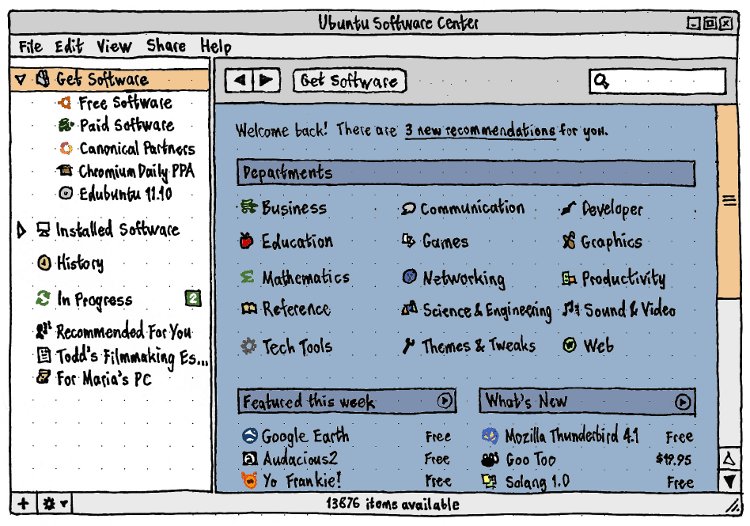
The new "Ubuntu Software Store" has been renamed to “Ubuntu Software Center” - caving in to users dissatisfaction over the choice of name.


© Ohso 2010 All rights reserved | Site designed by Jeff V and TSM1428. Created by d0od |


