Showing posts with label screenlets. Show all posts

Android Clock screenlet theme

View Comments

Screenlet clock fans seeking an Android clock theme need look no further.

Regular readers may well know that I had made an Android clock skin myself but since it has disappeared from both my Drop Box and my hard-drive we can all thanks Slater91 for coming to rescue and creating a new one for people to download and use.

Download

Grab the .zip archive from Slater91’s deviantart page @ slater91.deviantart.com/art/Android-Clock-screenlet

Install

Extract the .zip, open up the screenlet control panel then click on the Clock screenlet, select "Install new theme" and proceed to choose the extracted file.

Continue reading

Ubuntu Mono Icon for Screenlets

View Comments
MadnessRed mailed me with his tip on how to make a mono-panel matching Screenlets icon.

You take this .svg by Darkhaseo and change the colour from '606060' to 'EAD3D0' via your preferred medium (gedit is quickest).

For the lazy this is the result: -

Download @ http://dl.dropbox.com/u/3000127/screenlets.svg

Installation

  1. Hit ALT+F2
  2. Type 'gksu nautilus /use/share/icons
  3. Hit enter/return
  4. Drag the mono screenlets.svg icon into the /usr/share/icons folder and confirm replacement
  5. Restart Screenlet Manager

Continue reading

Move Over Screenlets - Opera Desktop Widgets Come To Town

View Comments
The developers of web browser Opera recently announced plans to free their widget platform from the browser and let them run on the desktop. Users need no-longer have Opera running in order to use Opera Widgets.


"...as long as you have Opera installed, you can run any widget you like, without ever opening the browser." ~ Remigiusz Bondarowic, Opera

Opera widgets are also cross-platform allowing developers to focus on creating great widgets and not on porting and adapting them for various desktops.

The State Of Widgets
So where will the Opera Desktop Widgets sit within the Widget eco-system?

There are currently three main "widget" frameworks available on Linux, not counting KDE Plasmoids as they're DE-centric. Thes are Screenlets/Universal Applets, GDesklets and Google Gadgets.

GDesklets

Gdesklets is the oldest out of the current options and perhaps the least elegant. The majority of 'desklets' available are either out-dated or don't work properly. The last stable release of GDesklets was over 4 years ago.

Screenlets

Screenlets are perhaps the best known "widgets" for Linux. There are a ton of  useful "screenlets" out there, with plenty still being created.


Some screenlets.

The development of the Screenlet framework itself is less secure. The last release was well over a year ago, the project forked and re-named itself "Universal Applets" but this, too, seems to have stalled in development.

Google Gadgets

A popular if much maligned choice for desktop widgets is Google offering - Google Desktop Widgets.
 
Ubuntu-derived distribution gOS comes installed with Google Desktop Gadgets by default.

There are a multitude of well designed and useful applications available for it, most of which run on the Linux version flawlessly. Sadly, as with the other options, development on Google Desktop Gadgets has quietened down with no stable release on the horizon.

Opera Desktop Widgets

Firstly, kudos to Opera for calling widgets 'widgets'! Gadgets, Desklets, Screenlets, etc may sound cool, but when we think about what they are we think "widgets".

Widgets can be downloaded in any browser as the .wgt file extension will call Opera’s widget runtime to take care of the installation and, via the Widget manager, can be packaged up into .deb's.

    Opera Widget Manager
    Widgets are 'managed' using the Widget Manager. The entry for this sits in the Applications > Accessories sub-menu.

    'Manage' is a bit of a stretch when describing it in the current Alpha version, given the only option you have is 'uninstall'. One would assume some configuration action will, at some point, end up in here.

    Widgets
    The widgets themselves sit inside an folder named "other" - along with all the other applications Ubuntu doesn't quite know where to shove. It wouldn't be much to ask for the widgets to land in their own 'Opera Widgets' folder, would it?

    Two demo widgets are provided by Opera that take advantage of the newly un-caged framework. These are a Twitter client and a Google Translator.

    UI
    Widgets come with their own styles, borders and window dressing, but all have a little control toolstrip that sits in the top right corner. This does fade when unfocused.

    Widgets can also "dress up" in native system window decorations.

    "Normal" Opera Widgets also work the framework, though without being optimized UI wise there can be some annoying visual quirks.

    Download/Install

    Opera Desktop Widgets are currently in Alpha so don't expect a wonderfully stable walk in the park. That said there is very little chance of screwing up your system by install it to try out.

    The Opera Desktop Widget package is available in a handy .deb file. For total GTK integration download the QT4 version.

    32bit Link
    64bit Link

    Continue reading

    Android Clock Screenlet Theme

    View Comments
    I love Android. I can't afford an Android device mind, but i still love Android.

    I'm currently porting the Android icon set into a Gnome theme using Genoid's work so far as a base, but more on that later!

    Android Clock Theme
    No "Android" themed desktop would be complete without the Android clock widget so I hastily cobbled this together for use with Screenlets.


    Android aficionados may notice that the hands are wrong. They're currently borrowed from the cairo clock screenlet theme, but it looks the part for now! Here the clock on an Android phone: -


    Download @ http://dl.dropbox.com/u/1115768/android%20clock.tar.gz

    Continue reading

    Dropbox Screenlet Displays Freespace and More On Your Desktop

    View Comments
    Dropbox screenlet displays your current Dropbox usage, freespace and status on your desktop.


    The screenlet does require having Dropbox open and running or else it looks like this: -


    Download
    Download Dropbox Screenlet @ http://www.gnome-look.org/content/Dropbox+Screenlet

    Continue reading

    PerfectClock Screenlet Lives Up To It’s Name

    View Comments

    screenshot-2209

    PerfectClock screenlet is a Linux port of the desktop-clock Windows application. It comes with a bunch of pre-made themes, and tons more are available - from Dynamite shaped clocks to binary style ones.

    PerfectClock is a skinnable, flexible, fast and highly customizable program displaying an unlimited number of World-Time clocks on your desktop. ~ Official Blurb

    Requirements are minimal, just the usual Screenlets, Python & Gtk – which are installable in any Linux distro. (Screenlets requires Compositing).

    aw

    Feature wise it’s not totally parable with the Windows version, but then the Windows version is trialware anyway!

    It does feature the ability to add and remove themes, choose location, show/hide second hand, display day (if applicable) and set alarms.

    What gives it a thrust about the the generic “Clock” Screenlet that comes pre-packaged with Screenlets is the sheer amount of well designed skins for it, the stability of it and, well, the fact it’s an alternative!

    Download

    Download PerfectClock @

    http://www.gnome-look.org/content/show.php/Perfect+Clock+for+Linux

    Skins

    Find Skins @

    http://www.perfect-clock.com/index.php?page=download-user-skins 

    &

     http://www.perfect-clock.com/index.php?page=download-skins

    Continue reading

    Wide Weather Screenlet

    12 comments
    Display the weather and a four day forcast right on your desktop with this minimal screenlet.
    I first noticed this screenlet in an screenshot on DeviantArt by BilliShere and fell in love with it's simplicity. You can download the screenlet from: http://gnome-look.org/content/show.php/Wide+weather?content=77168 Installation Install it in the usual way by dragging and dropping it into the 'Screenlets Manager' window (Or Universal Applet's Window if you're using UA). Launch it with a double click and drag it to the position where you want it. Configuration To get the forcast for your city right click the screenlet and click 'Zip Code'. If you're living in the ol' USA then enter your zip code, if you're living elsewhere you can get you "zip code" by doing the following: - 1. Head on over to Weather.com 2. Enter your city in the search box and hit return. 3. Select the correct city. 4. In the Address/URL bar of your browser you'll notice something similar to this (varies depending on location): - http://www.weather.com/outlook/travel/businesstraveler/local/SWXX0022?lswe=norrkoping&from=searchbox_localwx 5. Copy the code after 'local/'. In the example above it would be SWXX0022. 6. Enter this into the 'Zip Code' part of the screenlet and click 'Apply'. Appearance The preferences dialog (right click > preferences) allows you to tweak the colours of the text and icons, the font an what sections are displayed. To get it looking as per the screenshots above, just turn the opacity down to '0' on both the background and border colour.

    Continue reading

    FolderView Screenlet

    3 comments

    This screenlet just popped up on Gnome-look.org and it’s very ‘ooooh!’.

    Anyone who has used KDE 4.x.x will have seen the plasma ‘folder view’ applet, if not glance below at the transparent boxes that show the files inside the specified folders right on the desktop.

    folderview-comments

    The ‘FolderView’ screenlet brings some of that sexiness to Gnome! Oh Yes!

    self

    Download it from gnome-look by clicking here.

    Continue reading

    Disc Mount Screenlet

    0 comments

    This disc-managing screenlet displays drives connected to your system.


    self

    Features:
    -Click to mount, unmount, and eject drives
    -Click to play audio CD’s, open other volumes in Nautilus
    -Hover to show name and status

    Options:
    -Horizontal or vertical layout
    -Show/hide empty optical drives
    -Use icons from your gnome icon theme

    Download

    Continue reading

    Battery Meter Screenlets

    0 comments
    Battery Screenlet
    This first one is a very simple battery screenlet that displays your real-time battery power as a graphic. 


    It’s icon is based on the Tango battery icon, so it integrates well into the Gnome desktop.

    Download from Gnome-Look @ http://www.gnome-look.org/content/show.php/Battery+Screenlet?content=99587

    BatteryState
    This one is slightly more informative, providing the user with info on:
    • remaining capacity in percentage
    • battery health in percentage
    • remaining time to be discharged/charged
    • design capacity in mAh
    • last full capacity in mAh
    • remaining capacity in mAh
    • charging state


    It also has a ‘minimode’, can support multiple battery systems and provides a notification when your battery is low.

    ACPI Battery Screenlet Theme
    This last one is just a theme for the default battery screenlet that ships as default with Screenlets. Install it as you would install any extra theme by opening up the screenlet manager, selecting the screenlet and dragging the theme into the window!

    Continue reading

    This Weeks Best New Screenlets

    0 comments

    Here’s this weeks round up of the best new/updated screenlets.


    DIGGER (Digg Screenlet)

    99789-1

    If you’re a DIGG fan this screenlet packs in a lot of features!

    Choose the topics it displays, how many it displays and even the way the articles are sorted! Fully collapsible design, too. Don’t blame me if you end up wasting hours reading the most popular stories on the net!

    If you like the screenlet the developer encourages you to, well, DIGG it! You can do so by clicking here.

    Download


    CPUMeter

    99584-1

    This is yet another CPU/RAM monitor but with a difference – it has super smooth animation! It’s really sleek and has a theme very similar to Vista’s default 'CPU gadget’.

    Download

    Continue reading

    My Top 4 Screenlets (For Now, Anyway!)

    2 comments
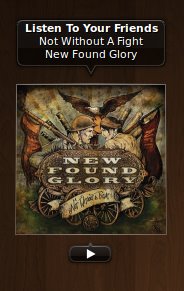
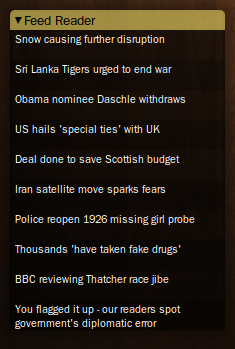
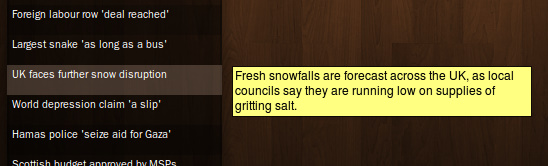
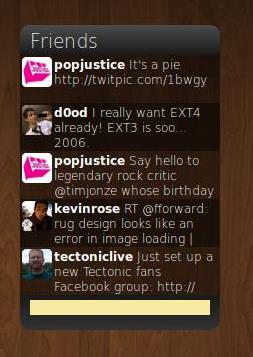
    Here's a quick run-down of my top 4 favourite screenlets right now. 1. Now Playing - with Inlaid Alt Theme nowplaying1 A luscious and slick theme for the default 'now playing' screenlet. Has Previous, Play and Next buttons that only appear when you 'mouse' over them. I really think this should be the default theme for this 'let as it is not only gorgeous, but oh-so-modern. 2. GMail Screenlet screenshot_04 A simple GMail monitor that shows the number of unread mails. Simple. Ron-seal. Very nice. 3. RSS Reader screenshot_05 screenshot-1png This is the default feed reader screenlet in, er, screenlets and it's a simple looking enough one... packed with eye candy features! Hovering over a story will display the content of that story in a 'hover box'. 4. TwitterScreenlet twitterlet Despite the plethora of AIR based Twitter Clients, having atwitter screenlet is handy, too. This one can display a specified number of tweets, lets you update your twitter easily and can be themed. I really like it - it's simple, effective and blends in nicely with my desktop. So there we have it! You can easily find these screenlets on gnome-look.org by just typing in their names. (E.G. 'Gmail Screenlet'.)

    Continue reading

    OMG! IRC!

    OMG! IRC!
     

    Popular Threads

    Powered by Disqus

    Designed on

    Blog Archive

    Recent Comments

    © Ohso 2010 All rights reserved | Site designed by Jeff V and TSM1428. Created by d0od | Back To Top