Showing posts with label themes. Show all posts

Ubuntu Ambiance theme for Windows XP & Wine

View Comments

Often it's newer Linux users missing the familiarity of Windows that skin their OS to mimic that of another but here the tables are turned; fed up of booting into Windows and everything looking so different from the comfort of Ubuntu? 

Meet Light themes for Windows.

The awesome hands behind the skin are those of~Freddi67. Speaking to OMG! Ubuntu! about the reasoning behind the theme he said: -
 
"I think with Maverick's new polished style, it's good to have also a windows version of it. Be it for promotion, for Ubuntu-Transformation-Packs or Wine and VirtualBox.
Wine already supports visual styles on some controls (although this slightly influences performance). Maybe for the moment, the aesthetic aspects or secondary when we use Wine, but for attracting the new users in future we will need to offer an impeccable desktop appearance."

Download

Help wanted

As good as the port looks so far the author still has a few issues outstanding, noting on his deviantart page:

"This is a work in progress and there are still some bugs. If you have more knowledge of Windows Visual Styles, it would be great if you could help me"
  • I couldn't get the progress bar to work
  • In general windows uses smaller sizes of fonts and controls
  • Some font colors still do not match
  • Problems with the dark menu background (some apps override it and display both text and background white)
  • An icon theme would be awesome, as well as Radiance and Ambiance Dark color scheme
  • Although Wine supports partly Visual Styles on some controls, the transparencies do not work properly in this theme (magenta backgrounds)

Anyone with knowledge on working with Windows themes would certainly be welcome to join Freddi.

He has provided the source files here but notes that  ‘for editing, one needs StyleBuilder, for using the style one needs a UXtheme Patch’.

Continue reading

Candy for your music: Elementary CoverGloobus theme

View Comments
When I saw that reader SciFi Jerry had popped a link to a CoverGloobus theme into the OMG! inbox my first thought was "I've only just posted a CoverGloobus theme, I'll have to hold this back for a few days."

And then I looked at it.
Created by ~Orsobasso over on Deviant Art it's a wonderfully good-looking addition to the pantheon of CoverGloobus themes and certainly a candidate - if you're reading Jordi ;) - for being bundled up with the coverart app by default.

Fawning over, here's the download link. Install instructions can found tucked neatly inside.

Continue reading

Finally - A Chrome theme for Elegant GNOME!

View Comments

Chrome/ium fans using the Elegant GNOME theme/script pack we featured yesterday can rejoice! A very ace dude by the name of JurgenWagen has created an Elegant-matching Chrome/ium theme that is just the thing for those of use with OCD over how our desktops look.

“I saw your cry of desperation after finding out that the Elegant Gnome script didn't come with a Chrome theme, so I decided to make one. I hope it's good!”

Jurgen, it’s ace! Thanks!

Download over @ http://toopredictable.deviantart.com/art/Elegance-Theme-for-Chrome-ium-176672425

Continue reading

Dramatic desktop theming script ‘Elegant gnome’ gets even better

View Comments

It’s been a good month or two since we last spoke about the all-in-one script ‘Elegant Gnome’ which takes your drab default desktop and paints it with pretty - with no hassle involved!

The pack now comes with a GUI installer, a PPA for updating and all of the the same goodies it previously shipped with: -

  • AwOken icon theme
  • Elegant GTK theme v 2.0
  • ‘gDIGE’ Wallpaper
  • Keyboard layout indicator flags
  • Firefox theme
  • Smplayer theme

Sad to see no Chrome theme included yet - but you can’t have everything!

Install

‘Elegant Gnome’ requires the following packages pre-installed in-order to work. (Click each item to see instructions or PPA): -

Now add the PPA: -

  • sudo add-apt-repository ppa:elegant-gnome/ppa
  • sudo apt-get update && sudo apt-get install elegant-gnome

Substituting ‘elegant-gnome-mint’ on the last line if you use Linux Mint.

Continue reading

Beautiful "Elementary" Style GNOME Shell Theme

View Comments

Ubuntu user and graphic designer Half Left has put together several different Gnome-Shell themes, including this one based off of Elementary OS. I don't know about you, but personally I'm a total Gnome-Shell hater. However, themes as beautiful as this make me interested in using it all over again... for at least ten minutes till I bang my head in frustration. But at least it looks good!

You can grab this theme and more over from Half-Left's deviant art page, where he has also kindly posted instructions for installing. Hopefully you, our faithful and dear readers, are able to read the instructions there and I won't need to copy and paste them again here.


 Applause goes to Joern Konopka for drawing my attention
I won't link his twitter unless he asks, wouldn't want to spam it.
And look XFact! Tags! As many as I could think of.

Continue reading

Sonar theme pack for Ubuntu - give your desktop a green makeover (link fixed)

View Comments
OpenSUSE's default GNOME theme ‘Sonar’ is often regarded as one of the best Gnome themes around. That is, of course, open to debate but the green hues and light gradients used by the Chameleons’ theme is nevertheless popular with many.

Sonar is no stranger to OMG! - we previously featured it in December of last year to celebrate the release of OpenSUSE 11.12.

If you liked it then you’re going to love it now.

Sonar ’10

The Sonar ‘10 pack by DanyR contains: -
  • Sonar GTK Theme
  • Fifth Leg titlebar font
  • Sonar Icons
  • Latest GNOME Icon Theme
  • openSUSE's default wallpaper and an alternative Ubuntu branded one by cldx
  • Easy install script

Download & Install

Installation using the provided script is a doddle: -
  • Download the theme pack @ this link
  • Extract it
  • Move it to your home folder
  • Open up a terminal
  • Enter: chmod +x install.sh && ./install.sh .

Continue reading

Seif Speaks: My Sexy Desktop

View Comments
Well I received a lot of comments and mails about my overall *sexy* desktop layout and look. So to get everyone down a bit here is what you need to use and set up to have your desktop look like mine...
  • Get the Elementary wallpaper right here
  • Get Docky
    • sudo add-apt-repository ppa:docky-core/ppa
    • sudo apt-get update && sudo apt-get install docky
  • Once done set your Docky settings window to look like this:
  • Ok now for the fonts:
  • And last but not least the Icon Set, I use Faenza:
    • sudo add-apt-repository ppa:tiheum/equinox
    • sudo apt-get update && sudo apt-get install faenza-icon-theme
  • I modified the theme by changing the controls to Dust
I hope you enjoy the experience like I do.

Continue reading

New Ubuntu Light themes land in Maverick

View Comments

Just a quick heads up to Maverick testers and early adopters - the new-look Ubuntu Light themes are due to land in Ubuntu 10.10 any second. You need only run an update to receive them.

The new themes consist of ‘Ambiance-Maverick-Beta’ and a darker variant which can be applied via the Appearance properties window. Both sport neater, softer and more curvaceous looks.

The staple Ambiance and Radiance themes of Lucid remain included, too.

If you’re too impatient to wait for this update to filter through you’ll find the .deb available here but note that it depends on Murrine engine 0.90.3+git20100810.

Continue reading

Confirmed: that was, indeed, the new Ubuntu Light theme

View Comments
Canonical design team member Otto Greenslade has confirmed that the new Ubuntu Light theme we showed you yesterday is indeed the real deal.

Speaking on the Canonical design blog he details some of the more apparent changes we noted in our previous post as well as offering up some of the reasoning behind said changes.

Speak about the 'evolution' of the theme he says:

"I have been working extensively with Andrea Cimitan (creator of the Murrine theme engine) over the last couple of months to improve and accelerate our workflow. It’s been fantastic having his extensive knowledge, ideas and fresh perspective to fine tune across the board."

Better yet you can try the new themes out using the packages at the link below: -
Dark Schmark
Otto touches on the new 'dark' theme we revealed yesterday and, as we suspected, reveals that it is very much a WIP: -

"It seems that the dark version of the theme has been leaked. ...*at this stage* is not necessarily intended as a full theme but to be used by certain application environments that would benefit from a darker UI, for example: image/photo manipulation and video editing."

New Icons
As an end note Otto also reveals that a 'shiny new icon theme' will be sought within the next year, with a brief for submissions going out shortly. Continuing he says: -


"We’re looking for something truly special and would very much like some of the innovation from the community to shine through – to be the icing on the cake to our desktop identity."

Continue reading

‘A new start’ GTK theme - looks everybit as cool as it sounds

View Comments

128431-2‘A new start’ GTK theme looks, from the word go, pretty much unlike anything else you’ve tried before.

An aptly titled theme that has that oh-so aloof quality of actually being able to totally transform the feel of your desktop in an instant, it’s one theme worth downloading to see whether it works for you.

The theme package comes with a tonne of goodies including GTK, Metacity, Gnome-Panels, CoverGloobus theme, conky stuff & even a custom Firefox start page with some neat hover-effects.

Download @ http://alecive.deviantart.com/art/A-New-Start-June-2010-169100684

Best used with the AwOken icon set: http://alecive.deviantart.com/#/d2pdw32

Continue reading

Clearlooks Revamp GTK theme is light, stylish

View Comments

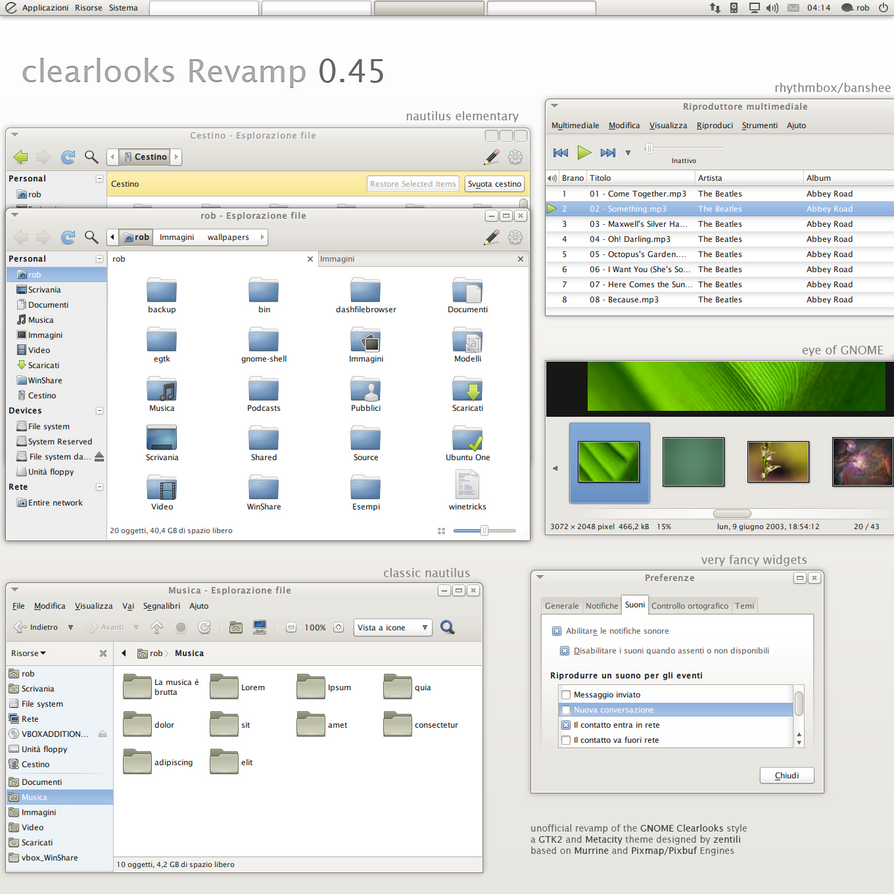
It may be the default theme for stock GNOME but the ‘Clearlooks’ GTK theme no-doubt remains on the fringes of taste for eye candy aficionados. Nevertheless the theme provides a clean and distraction free look for your desktop - but could it better?

Enter ~zentili on Deviant Art who certainly thinks so and has just updated his Clearlooks Revamp theme to version 0.45. More than just a lick of gloss, Zentili affirms that “ [every] aspect of the gui has been considered”.

Features

The theme doesn’t require any extra theme engines to be installed instead relying on the default Murrine and Pixmap/pixbuf engines to have the drawing.

The theme pack contains versions for both standard Nautilus and Nautilus-Elementary as well as a very bland wallpaper.

Download

Download the .zip file from the link below, extract and then install the relevant theme pack in your preferred method (e.g. open appearance properties, go to theme tab, drag and drop)image

Tip via RayRaven

Continue reading

WoW GTK theme lives up to its name

View Comments

Give your desktop a cold, steely makeover with ‘WoW’ gtk theme by ~nale12.

The folder contains: -

  • wow gtk theme
  • wow-dark gtk theme
  • wow-light gtk theme

Elementary versions for use with Nautilus Elementary: -

  • wow-elementary gtk theme
  • wow-dark-elementary gtk theme
  • wow-light-elementary gtk theme

Plus: -

  • two emerald themes
  • two xfwm themes
  • and an alternate metacity without rounded bottom corners

The wallpaper used in the above screenshots can be procured here.

Download

Continue reading

Give your desktop a dramatic overhaul - with one script!

View Comments
Give your desktop a dramatic make over with the ‘Elegant GNOME’ theme pack.


If you’re looking for something that isn’t simply a variation on the default Ubuntu Light themes, shies away from looking like Aero & shuns using garish colours just to ‘seem different’ then Elegant GNOME by arobase could be just what you’re looking for.


The theme comprises of the mono-esque AwOken icon theme, a tweaked version of the sublim Re Crono theme by =lassekongo83 and a great wallpaper by *Muscarr called ‘gDIGE’.

Download

‘Elegant Gnome’ requires the following packages pre-installed in-order to work. (Click each item to see instructions or PPA): -
Then you can proceed to install the theme: -

image[3]

We’ve featured a similar concept before - so if you like the idea but not the look of Elegant GNOME check out Spatial Desktop.

Continue reading

(drum roll) The mystery ‘Chromium menu theme’ is revealed…

View Comments

If you remember seeing this a day or two back and thinking “Ooooh”….

…followed by feeling a bit “Boooo” when looking at your stock Ambiance theme, then perk up - I need your ears, eyes and attention! The identify of the mystery theme has been deduced!

It’s called ‘Dichotomy’ and was proposed for inclusion in the Community artwork package during the Lucid cycle. We even featured it here on OMG! back in March this year.

image

Thanks, once again, to cmyrland

Continue reading

Impression GTK Themes Get radical update for Meerkat

View Comments

As the 10.10 development cycle rolls along various user-created themes are submitted for potential inclusion in the ‘Community Themes’ package.

The popular Impression themes have been available for a few cycles now but, for Maverick, have now garnered themselves a striking visual overhaul. Whilst the images you’ll see below aren’t final per se they certainly show that impression is, indeed, heading in an impressive direction. Be sure to check out the wiki page for more developmental reasoning on the changes.

Refresh

The first thing you’re going to notice is the inclusion of a consistent colour palette based on that of the ‘new’ Ubuntu branding.

“Impression embraces vibrant warm orange…http://farm5.static.flickr.com/4073/4755682845_4666191e06.jpg
…and Night Impression a cooler aubergine.”http://farm5.static.flickr.com/4096/4756321660_246899fe17.jpg

Install

Yep - you can install these already! To err on the side of caution note that these aren’t by any means final versions but progress snapshots.

Packages

Installation

  1. You will need to install the  latest Murrine GTK engine from PPA (inless you’re already using Maverick)

  2. Once installed log out and then back in
  3. Open System > Preferences > Appearance Dialogue
  4. Click the Install button.

  5. Select the relevant impression tarbell file from its download location
  6. Select ‘Impression’ or ‘Impression Night’ theme

Continue reading

Daily 5: Five Retro Desktop Themes

View Comments

imageWith a move towards every sleeker, ever more visually animated desktop themes and GUI’s it’s easy to forget how far the themes we use now have come along in such a short space of time.

With that in mind here are some retro desktop themes in case all the fancy-pants themes of today have left you longing for the BeOS styling's of yesteryear…

Windows 2000

We kick off this rundown with the dull  grey styling's of Windows iconic pre-Crayola theme. If you so wish you can almost faithfully recreate it in Ubuntu using the Gnome Redmond theme, a similar metacity and an icon pack.

mywin2k

See this Ubuntu Forum thread for a blow-by-blow how-to.

NeXTSTEP

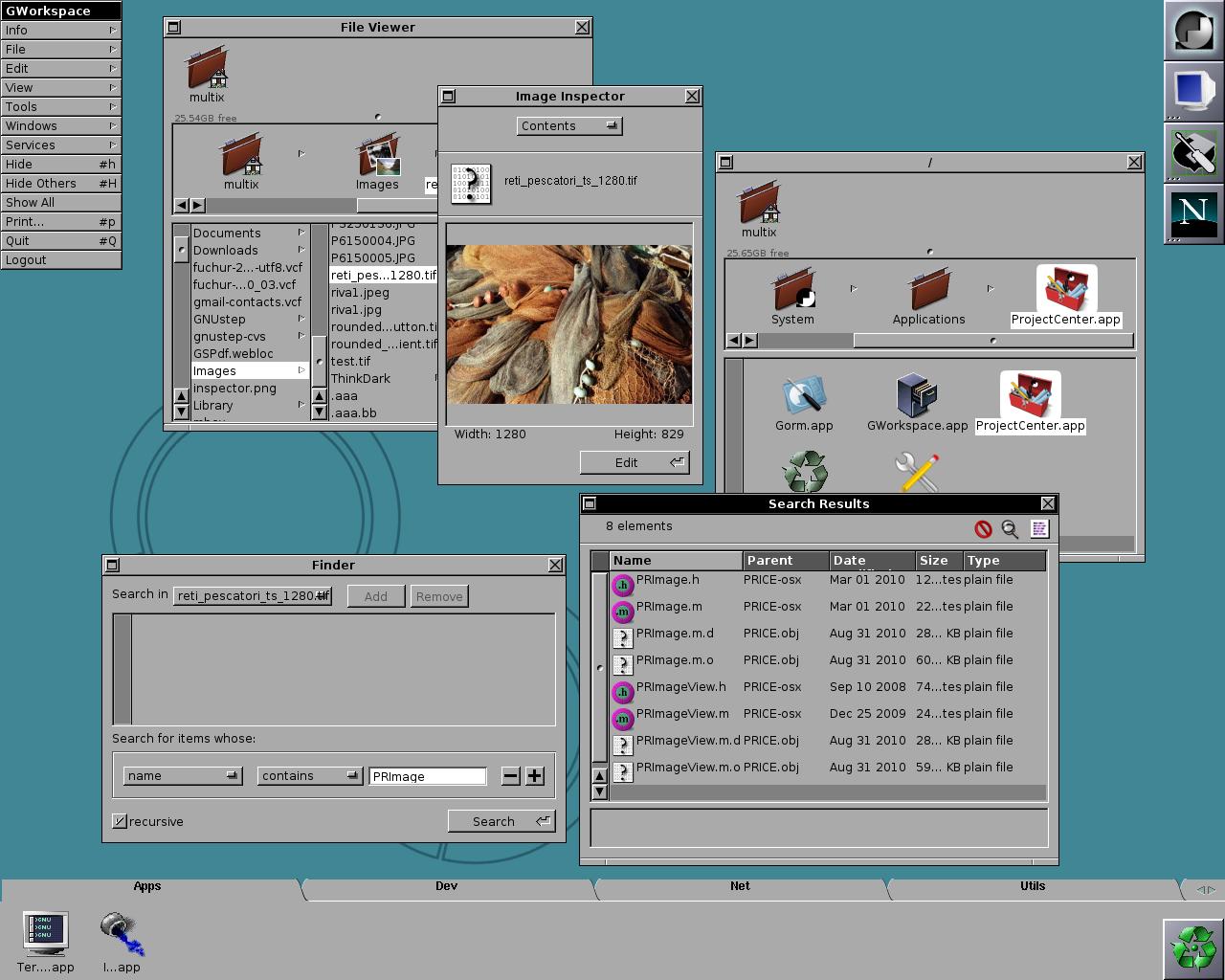
NeXTSTEP was a promising UNIX-based operating system that began life in 1988 and ended it’s formal life in 1996. NeXTSTEP is best known for that little known-Macintosh operating system called ‘OS X’ being a direct descendant of it.

NeXTSTEp had a very distinctive look and feel. Distinctive enough to warrant a semi-port project - entitled GNUStep - aiming to bring the look and feel of the long-forgotten OS to Linux. (I should also point out that GNUStep is much, much more than simply a ‘theme’ - see here for more on it) 

Whilst the project hasn’t really progressed much in the last few years it is still available to download and install. If you’re curious-come-bored installing GNUStep wouldn’t be an entirely awful way to waste a weekend.

Downloads and more info @ http://www.gnustep.org/

BeOS

The almost 20-year old BeOS sported a GUI “developed on the principles of clarity and a clean, uncluttered design” and for many BeOS enthusiasts out there (such as the Haiku project) the GUI remains a distinctive part of the BeOS legacy.

Download http://gnome-look.org/content/show.php/Beos-r5?content=116031

AmigaOS

AmigaOS 4 perhaps shouldn’t be classed as ‘retro’ given it’s last update was only 54 days ago however the AmigaOS remains nothing more than a nostalgic interest for most hence its inclusion here.

The theme above is a GTK version of the AmigaOS 4 ‘zami’ theme and can be downloaded here.

OS/2

IBM’s OS/2 operating system - initially jointly produced with Microsoft - had a very tumultuous time and the history of the OS makes for great reading. It was once heralded as the ‘OS of the future’! Sadly it wasn’t to be largely due to Microsoft’s bundling of Windows with every new PC bought. It had an ‘ok’ gui for the time and for those who remember OS/2’s GUI the GTK version below is a good effort of an adaptation.
Download @ http://gnome-look.org/content/show.php/OS2?content=106253

Honourable mentions

I dearly wanted to include an old skool Acorn GTK theme but couldn’t find one, the same goes for ‘classic’ Mac OS.

What is your favourite ‘retro’ OS/GUI? Is it available to install? Share below!

Continue reading

I may be biased but this is the best GNOME-Shell theme I have ever seen…

View Comments
WIP theme created by Tamara, using elements from OMG! Ubuntu!

Continue reading

Daily 5: 5 beautiful themes by pr09studio

View Comments

We love the work of Pr09Studio, real name Leo, here at OMG! - so much so that we’ve featured his wallpapers, his themes and even his pet dog several times already. Okay maybe not the dog but PR09Studio is like a battery powered theme machine churning out high-quality themes and wallpapers at an almost alarming rate. Not that we’re complaining, mind.

To celebrate and highlight some of Leo’s ace works today sees the OMG! Daily 5 list five of PR09Studio's bestest everest themes.

SmartRadiance

A GTK theme created to fit in with the new Ubuntu 10.04’s colour scheme, SmartRadiance comprises a GTK theme, Metacity, Desktop wallpaper & panel background. It’s a subtle, pastel and unobtrusive affair that would look great on anyone's desktop. image[3]

Touch the light

This theme is based on Radiance but with some subtle refinements to the progress bars, overall tone & tabs.image[3]

Smart Dark GTK

We featured SmartDark properly a week or so back and the reaction it received from readers was amazing - a sleek, purpley dark theme that shows that Ribena isn’t just popular as a soft drink. image[3]

Simplistica

Flat, non-glossy and minimal. Simplistica is a theme for those who don’t want their themes overly distracting or shiny but more functional looking.000[3]image[3]

SmartLight

The ‘light’ version on which SmartDark above is based on, it’s marries a subtle colour scheme with some wonderfully minimal effects - just look at the sliders and tabs. An ace theme.image[3]

Continue reading

Elementary Theme gets new release; improved look

View Comments
A new release of the popular Elementary theme has been made - adding improved support for Nautilus-Elementary, a revised style for the Midori web browser and some new look minimal scroll bars.

The theme also sees notable speed improvements & bug fixes.

Installation

The latest and greatest release of the Elementary GTK will be available via the Elementary PPA very shortly. In the mean time if you're dying to play with the new scrollbars you can download the theme @ http://danrabbit.deviantart.com/art/elementary-gtk-theme-83104033

Note that Elementary uses - and thus requires - three theme engines: Murrine, Aurora, and Equinox. Two of these are pre-installed in Ubuntu, and the third, Equinox, can be installed via the Elementary PPA.

Continue reading

Elementary Empathy Theme

View Comments
Talented designer MastroPino strikes again; yesterday we featured his wonderful Elementary Pidgin theme and today we're excited to share with you his equally-sublime Empathy theme.
Rock out with your, er, empathy out.
I much prefer Empathy over pidgin but hate the default icons it comes with (y'know, those coloured shapes...) so whether or not you use Elementary as a theme this icon set will surely improve the look of Ubuntu's default IM app on any desktop.

Download and instructions over @ MastroPino's deviantart page

Continue reading

OMG! IRC!

OMG! IRC!
 

Popular Threads

Powered by Disqus

Designed on

Blog Archive

Recent Comments

© Ohso 2010 All rights reserved | Site designed by Jeff V and TSM1428. Created by d0od | Back To Top