Showing posts with label pitivi. Show all posts

Video Effects in PiTiVi

View Comments

Ubuntu default video editor PiTiVi currently lacks video effects - but this won't be the case for much longer.

PiTiVi developer Thiblahute has been working on implementing effects into PiTiVi as part of his Google Summer of Code (GSoC) project: “Permit Pitivi users to add effects to the videos they are editing".

He’s been keeping user users fully abreast of his development on his blog where Thublahute notes that the work so far “..is still quite buggy, and not really ergonomic, but it is the beginning!”. His next step will be to focus in on the UI elements (for example there is currently no way to easily edit an effect once applied.) Before that will come some code clean-up and bug fixes.

Take a peek

Below is a quick peek at Thublahute’s PiTiVi progress so far. In the video I apply a range of effects to a random video I found in my Video folder and preview them. It’s simple stuff but shows off the promise PiTiVi effects can offer as well as the pretty solid work in their enablement.

GSoC student Thibalhute has been hard at work hacking support for video effects into PiTiVi - and so far so good. Whilst this is very demonstrably a WIP it's nevertheless a promising start!

If you’re interested in trying out this WIP ‘PiTiVi with effects’ you can install it via Thiblahutes Git repo @ http://github.com/thiblahute/pitivi

Continue reading

PiTiVi Creator Responds To Readers Fears...

View Comments
Earlier today Edward Hervey of the PiTiVi team responded to my previous post regarding PiTiVi becoming a default application in Ubuntu.


His response was very well mannered and addressed many of the concerns both I and readers had concerning PiTiVi's' potential inclusion in the default set of applications in Ubuntu. So much so I decided to whisk it from the murky depths of disqus and post it here so more people could read his response!


This is the reason comments were closed off from the previous post; so they may continue here with his response informing any further discussion.


May I also remind reads that this site is run, written & sourced by ONE person [myself] and personal insults are not appreciated. You are not forced to read this blog.


---


What a depressing post (in some aspects). I'll answer the various questions/comments/rants all the same.

Re: PiTiVi doesn't support DV/mpeg4/whatever-format

Where did you get that idea from ? PiTiVi doesn't come shipped with codecs, it relies on GStreamer to provide the needed plugins/decoders/etc... If you load a DV file in pitivi and you don't have the plugins, the application missing-plugin system should appear proposing you to download the needed plugin.


(I will reply on this: I personally got this "idea" from the UDS09 meeting where this was raised. I have, personally, had issues with formats in PiTiVi so one can understand why this issue comes up.) 

Re: Collabora pushed PiTiVi aggresively into ubuntu
 That's 100% totally wrong. I personally had chats with Jono and Rick Spencer about having PiTiVi shipped as a default application, and canonical were interested by the idea of having a video editor shipped by default. All of this was far from being enforced, or us (Collabora) going out of our way to have PiTiVi shipped by default. And nothing's engraved in stone at this point. If we (pitivi development team) get feedback/help on improving what's bothering people by the Lucid release date and people deem it good enough to be shipped by default, great ! If we get no help... well.. PiTiVi won't die and people will still be able to use it via PPAs.


(The "pushing" quote came from the blueprint on launchpad and from the meeting at USD09. The quote has since changed on the blueprint to a less aggressive sounding one.) 

RE: Why ship PiTiVi as default app and not another video editor
I'd say the main reason is that all the dependencies (except for goocanvas, which is pretty slim) are already shipped by default : GStreamer, GTK, python. All the other editors would require bringing in more dependencies. I'll let Canonical/Ubuntu confirm that or not.

RE: lack of features ...
On this part we have always taken the stand of making sure features are as solid as possible before adding new features. In terms of video editing, that means you do need to have input/output format support rock solid, trimming/cutting rock solid. Check out how many clips/movies/documentaries/... out there and see how much of them make use of video effects, for how long, and how many don't.


The two features we find critically missing are : video transitions and overlaying. I just merged yesterday the videomixing branch yesterday to master which enables setting transparency on every video streams (like Sony Vegas does). It still has some issues, but having it in master will force/speedup the bugfixing process.


Video effects are not a top-priority. Getting those... without being able to do the features above are pointless. We won't diverge from that point of view. Helping us get the above rock solid as fast as possible ... will mean you will see video effects faster.

To people throwing generic rants about sucking
Write a video editor (or any non-trivial multimedia applicatoin), then come back and rant about other people's application sucking. Then we might have a proper discussion. In the meantime... you're not improving the situation.


(This is a bit hyperbolic. Users have a right to have opinions on software, particularly software that may be part-and-parcel of promoting Ubuntu to new users. Everybody's opinion is valid - even if it is misinformed.)

PiTiVi is dead or no longer maintained
The 3 main developers (who also happen to be hired by Collabora and that includes myself) have been working on some other company work in the meantime. Keeping Collabora hiring those 3 developers, means ensuring they have time to be paid to work on it also. (I'd personnaly love to have people working 100% of the time on PiTiVi ... but you need to take into account the reality of running a business).


We're progressively getting more company time for PiTiVi (Brandon has been back on it full time for the past frew weeks for example). It's far from being abandoned/dead, just that we do it at our own pace. It's freely available (LGPL, no copryight attributions required) and will always stay that way. We always welcome contributions and are pretty fast to review/commit patches.

Drop in on #pitivi on 
irc.freenode.net or send us a mail on pitivi-pitivi@lists.sourceforget.net and come and give your feedback, what can be improved, what's good and should be kept and ... who knows ... be part of the pitivi team :)


Edward Hervey: PiTiVi creator/maintainer, GStreamer hacker, Collabora Multimedia co-director

Continue reading

PiTiVi On Course To Become A Default Application In Lucid

0 comments
UDS Wednesday kicked off with a super interesting session; a meeting entitled "Application selection in the default install". 

Over three posts I'll present the main ideas and discussions from these meetings: Whittling the default game selection down, removing GIMP from default installs & what best to use for photo-editing and the decision to potentially include PiTiVi as a default application in Lucid Lynx...

Remember that nothing is final and decisions may change over the course of the development cycle.


Open-source video editor PiTiVi is on course to become a default application in Ubuntu Lucid Lynx, as has been proposed at UDS09.


Ubuntu gaining a video editor is a wise decision. Windows has one, OS X has one and so should Linux. Not to follow their lead but to give users what they have come to expect from a modern desktop operating system.


Sadly the decision has been taken to 'trial' PiTiVi as the video editor in Lucid, and depending on its progress during the development cycle, decide on if it should stay.


PiTiVi = Wrong move.
PiTiVi is deemed "a good and usable choice" for two reasons: -
  • It has a simple interface
  • The company funding PiTiVi, Collabora, are "pushing for it to be included" in Ubuntu. (This quote has since reworded to 'Supportive of it being included in Ubuntu' in the blueprint spec.)
The first issue is a sound one. PiTiVi follows the same "UI" as Windows Movie Maker and closesly resembles other Non-Linear editors.


PiTiVi also uses the Gstreamer framework for its decoding and encoding and as such is the closest thing to a 'native gnome' video editor.


Why It Sucks
PiTiVi can't currently handle a bunch of input formats,  including, for most people i know, a rather crucial one: DV. This was considered irrelevant at the meeting as most people, apparently, use videos from flip-cams. (Source, guys?) Most flip-cam's i've used encode to MP4 which isn't a format enabled by default in Ubuntu. PiTiVi has an issue with MP4, too...


If you use .ogg though you're away!


Half-baked
I used to love PiTiVi but its development is slower than slow. For it to be included in Ubuntu by default, and for the GIMP to be removed, will send a wrong first impression to users; Presenting them with a half-baked video editor that, lets be honest, can't do much aside from trimming and arranging. Is that a good initial impression? Do we really want to give users a video editor which doesn't match even the basic-of-the-basic video editors available for Windows?


Give it a shot
Open-Shot is the daddy of video editors on Linux. It can handle green-screen, pretty much every format you chuck at it, you can apply effects and transitions to clips, easily output video into a number of formats using its simple preset menu, or get down and dirty with specifics using the advanced version.


It has good support and fast development.


The reasons why OpenShot isn't a contender is because (quotes from the meeting): -
  • "It has serious UI problems"
  • "Its GNOME integration is awful"
  • "it has issues"
The UI has problems? Compare OpenShot & PiTiVi: -


They look the same!


Gnome Integration is awful? I can drag and drop to both... What more integration does one need in a video editor? 


As for the unspecified "issues" OpenShot has, i'd say PiTiVi has a greater share to worry about...


Regardless of what is included as default, both are useful applications. 


From what i gathered at the end of the meeting, PiTiVi is to be chosen and trialled. It will be reviewed around Alpha 2 and asked "is it worth it?". 


I just fear Lucid is shaping up to be a watered down example of a Linux desktop.

Continue reading

PiTiVi 0.13.3 Released -

View Comments

A new version of PiTiVi – a Video Editor for Linux - has been released.

Code named “We Shall Never (Sur)render”, it has a new slew of bug fixes and some new features: -

  • Fix rendering failures
  • UI beautifications
  • Switch to themeable ruler
  • Speed optimisations
  • Show the project name in the window title

You can grab it now from the official PPA. Note that this will also update your GStreamer packages, too.

Ubuntu PPA @ https://launchpad.net/~gstreamer-developers/+archive/ppa

Continue reading

PiTiVi 0.13.2 Released To The Wild

0 comments

The PiTiVi team have announced the latest release of their popular Video Editing application.

PiTiVi 0.13.2 adds the following support/features to an already impressively stable ‘basic’ video editor: -

  • Undo/Redo support
  • Audio mixing
  • Ripple/Roll edit
  • And the usual truckload of misc improvements/bugfixes

The next release in the current 0.13.x series should, according to the PiTiVi Roadmap, see the implementation of the “most wanted” end-user features: -

  • Titling Support
  • Effects
  • Transitions

The PiTiVi team strongly recommends users have all official latest gstreamer libraries and plugins installed for the best user experience.

You can install the latest GStreamer libraries, as well as the latest PiTiVi release from the following PPA: -

PPA: https://launchpad.net/~gstreamer-developers/+archive/ppa

Continue reading

PiTiVi 0.31.1 Released; Transitions, Effects Coming In July

View Comments
The PiTiVi team today announced the release of the latest version of their impressive video editor - the first in the unstable 0.13 PiTiVi series. This release sees a number of improvements made, most notably: -
  • core rewrite
  • multi-layered timeline
  • trimming features
  • audio waveforms and video thumbnails in timeline
  • picture support
  • New project file format support
The PiTiVi team strongly recommend that users have all the latest gstreamer libraries and plugins installed for the best user experience possible, and whilst i would not recommend novice Ubuntu user try out this version yet (wait for a .deb!), you can find all source and packages via the official PiTiVi site @ http://www.pitivi.org/wiki/Downloads The team have released this version in memory of those who lost their lives, friends, houses in the April 6th 2009 earthquake in l'Aquila, Italy. Eward Hervey, PiTiVi developer, also relayed some awesome news via his blog: That the next release of PiTiVi (due in July!) will bring with it the much desired transitions, mixing, effects, etc! Fantastic work guys! For PiTiVi newbies, or those who haven't heard of this excellent video editong application before, Jean-François Fortin Tam has made this informative video-demo on the new release. Enjoy and spread the word about PiTiVi!

Continue reading

Interview with 'PiTiVi' Maintainer

View Comments
Edward Hervey, maintainer of the most promising and advanced Linux Video Editor 'PiTiVi' answered some pertinent and probing questions from Christian F.K. Schaller over on the PlanetGnome blog. Below are some of the highlights of that interview. How would you describe the goals of PiTiVI in comparison with mainstream video editing applications such as iMovie, Avid or Final Cut Pro?

There are many goals for PiTiVi, but I'd say the fundamental goal from which all other goals derive is to be a video editor framework without any limitations (unlike all other editors that have got very specific limitations to what they can do or support).

Getting rid of the limitations of formats, devices, filters,... we can support is brought to us through the use of the GStreamer multimedia framework. All other editors have hardcoded this, whereas we can for example be proud in being the only Free editor not tied to any patent-encumbered libraries ! This also means that if a company makes a proprietary GStreamer plugin for a specific format/codec/device ... you also get it for 'free' in PiTiVi without having to do anything. This is the one limitation barrier we solved thanks to our design choices.

We also don't want to have a video editor whose functionnalities are static, that's why we chose to (re)write PiTiVi in python, and make the whole design very modular. The UI is not tied to the core backend, in fact you can even use it without a UI. The way the core backend is designed, you could also write different ways to represent the Timeline, some might be better suited depending on your level of expertise or what you would like to concentrate on most (which depend on where you're located in a production workflow).

The end goal is for PiTiVi to bring the basic editing tools without putting in any restrictions. That, unfortunately, comes at a cost : having to make sure all bugs/issues/limitations are fixed/removed at the proper level instead of adding hacks over hacks. And that takes time...

Which multimedia formats do PiTiVI currently support?

Anything the GStreamer plugins installed on your system can support, although some formats are inherently better for fast video editing, like those offering accurate seeking, I-frame only codecs, etc...

What is the state of PiTiVI and what roadmap do you have for it going forward?

Over the past 6 months we have done an in-depth refactoring of PiTiVi, based on the analysis I did last summer of the past 5 years of feedback we got on PiTiVi. Apart from enabling us to add new features much moreeasily, we have already implemented much needed features, like multi-layer editing, thumbnailing, trimming, ripple/roll editing, generic file format support, etc...

We are looking to do a first preview release of the new pitivi now in May. We'll then be gradually adding more features in the User Interface, such as transitions, effects, titling, slip/slide editing and more file format supports (allowing you for example to import projects from other editors).

For those not to familiar with the terms, what do you mean with multi-layer editing, thumbnailing, trimming and ripple/roll editing?

multi-layer editing: The possibility of being able to sort your videos not only through time, but also through several parallel layers.

thumbnailing : Having thumbnails displayed for each source used in the timeline, allowing you to quickly see what's being used in the timeline at any given point without having to seek.

trimming: Changing the beginning or end position of a source.

Ripple editing : shorten or lengthen an in- or out-point of a single piece of media, while moving all the media to the right of that clip up or down the timeline, to adjust for the new size of the altered clip.

Roll editing : Same as ripple, except the total running time of the group of clips remains unchanged.

Who are the current main contributors to PiTiVI apart from yourself?

The two main contributors apart from myself are Brandon Lewis, who started working during the Summer of Code 2007 and works mainly on the user-interface, and Alessandro Decina who started working in October mainly assisting me in the lower levels of PiTiVi and improving GStreamer. Both are Collabora Multimedia employees since last fall, working 100% of the time on PiTiVi. For those wondering about the business reasons for putting so much resources into PiTiVi at Collabora Multimedia, well first of all we do consulting work for customers in the content creation industries who want to use the PiTiVI editor for specific tasks in their production workflow and secondly we have customers who want to use the infrastructure we created for PiTiVI to set up automatic video manipulation tasks in a UI-less fashion. For example automatic cropping, rescaling and transcoding.

What future developments in GStreamer are you looking for in terms of enabling new features in PiTiVI?

Even though we have working editing features with the current GStreamer core and plugins, quite a number of features are being worked on to improve even more the editing experience.

One much needed feature is to implement the support of GstIndex in more plugins. This will allow non-editing-friendly files to be scanned when imported and have a file index created, allowing faster seeking in those files thereafter. This will also allow applications like PiTiVi to be able to have a better knowledge of the layout of the files, like the location of keyframes so that we can know ahead of time where's the most efficient location to seek to, or where we can do lossless cuts.

A never-ending work to be done in GStreamer is to wrap more and more libraries as plugins. People often mistake GStreamer as a codec library, which is completely wrong, GStreamer's a framework, allowing application writers to not have to worry about the processing parts, and processing library writers to not have to worry about the applications using them. Some libraries we should definitely get wrapped as GStreamer plugins are gavl and the overwhelming amount of excellent AVISynth filters (which will be done this summer as part of Summer of Code). All of these will definitely improve the user experience for PiTiVi.

Apart from that, we are going to carry on improving the memory usage and cpu usage of GStreamer core and the various plugins. And we're looking into making better usage of various hardware devices like graphic cards through VDPAU, VA-API and the gst-plugins-gl plugins. These will enable GStreamer applications to offload a lot of processing onto hardware devices, leaving more cpu time available for generic processing.

With Jokosher and PiTiVI both being multimedia editing applications, using GStreamer and written in Python, the natural question is if there is a lot of cooperation between the two projects?

Unfortunately not as much as can be expected. We've been helping each other a lot for all the underlying parts (GStreamer, python bindings, GNonLin plugins), but when it comes to the user interface and core logic we have different use cases and different code bases. It would be great to have tighter integration, allowing you to use Jokosher to edit the audio parts of a video clip, and PiTiVi to do the video parts.

What are the major technical challenges you are facing in terms of writing a video editor for linux/unix systems? How ready is the linux infrastructure for instance in terms of hosting such an application? And what is your opinion on the state of multimedia on linux/unix in general?

Open-source multimedia has come a *LONG* way in the past 10 years. For those who don't remember... we had to use different players depending on the formats back then and you could barely capture video from DV cameras. But the problem is that everybody is doing their own software in their own corner. There's a total lack of cohesion between all the various multimedia applications/libraries/device-support on linux which is IMHO the reason why we're not yet the reference platform for multimedia creation. Unlike on other plaftorms (win/mac), we don't have to rewrite our own libraries for certain multimedia/device support, but we can re-use existing ones... why aren't we there ? GStreamer tries to bring everything together and solve most of those issues, but is still getting kicked back by some software developers for some crazy unknown reasons. The day we solve that issue... we'll be the killer desktop platform just as we managed it for embedded devices and servers.

Which other multimedia applications do use yourself?

Totem, Rhythmbox, audacity (ouch, doesn't use GStreamer). I also sometimes use avisynth/virtualdub (win32 applications) through WINE, but that might change soon with a Google SoC project to wrap AVISynth filters as GStreamer plugins.

Interview conducted by Christian F.K. Schaller.

Read the interview in full @ http://gnomedesktop.org/node/4082

PiTiVi official website

Continue reading

Top 5 Apps Not Installed With Ubuntu

7 comments
There are some incredibly useful applications that don't ship with Ubuntu one for reason or another. Below i list my top 5 of the best applications you might be missing out on!

Pitivi - Simple Video Editor (like: iMovie, Windows Movie Maker)

Pitivi is a clean, user-friendly video editor along the lines of Microsoft's Movie Maker. Although Pitivi is still very much in active development (and thus a few things haven't been implemented yet) it does already have a stable release that covers basic video editing needs.

Hopefully at some point Pitivi will be bundled with Gnome as many end users now expect some form of basic video application to ship with their OS, and pitivi does fulfill this requirement.

Find it in Add/Remove by searching for 'Pitivi'


Cheese Webcam Booth - Take Photos Using Your Webcam (Like: iBooth)

I will happily admit this one isn't quite an essential, but it is fun!

Cheese Webcam Booth lets you take photos with your webcam, apply effects to them and upload them direct to Flickr.

Handy for taking an IM avatar or just plain old showing off.

Find it in Add/Remove by searching for 'Cheese'.'


Google Earth and Google Picasa - Useful (yet fun) applications!

These two Google products are both so different, yet both so great.

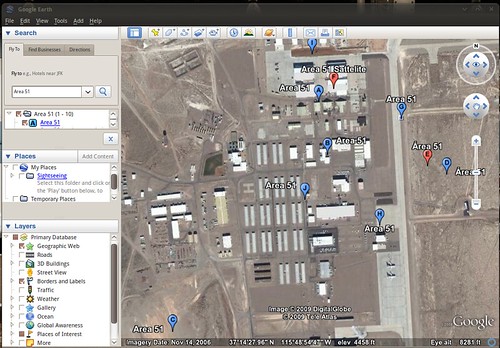
Google Earth "..lets you fly anywhere on Earth to view satellite imagery, maps, terrain, 3D buildings, from galaxies in outer space to the canyons of the ocean..". It's one of those application that you'll end up engrossed in. The animations are just as smooth as on the Windows and Mac versions, and boasts every single feature you'd find in those also.


(Be sure to follow my tip for getting Google Earth to user your desktop theme!)

Google Picasa is an excellent free photo manager and photo editor that is very, very similar to OS X's 'iPhoto'. It allows you organize, tag and sort your photos, as well as edit them (Auto-Contrast, Auto-Balance, red eye, brightness, auto-tone, etc, etc) and apply all sorts of effects (Black and White, sepia, saturate, crop, straighten, etc).


Google Earth: http://earth.google.co.uk/intl/en_uk/download-earth.html
Google Picasa: http://picasa.google.co.uk/linux/

Jokosher - Easy, User-Friendly Podcast maker (Almost like: Garagband)

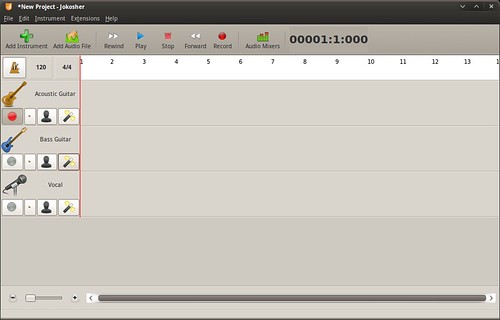
For a capable multi-track recording application, look no further than Jokosher.

Jokosher is not only a complete application for recording, editing, mixing and exporting audio - it's UI has been designed with total usability in mind. As such you'd be forgiving for thinking it was designed by Apple!

"The developers behind Jokosher have re-thought audio production at every level, and created something devilishly simple to use."


Install it now via Add/Remove

Almost Made The List: -
Record My Desktop -
Awesome screen-capture tool
Skype -
Make free VoIP Calls
Screenlets -
Wide range of useful desktop widgets
Songbird -
Very 'iTunes' like media player
SecondLife -
3-D Virtual World

Continue reading

OMG! IRC!

OMG! IRC!
 

Popular Threads

Powered by Disqus

Designed on

Blog Archive

Recent Comments

© Ohso 2010 All rights reserved | Site designed by Jeff V and TSM1428. Created by d0od | Back To Top