Showing posts with label videoeditor. Show all posts

Kazam - making screencasting tools modern

View Comments
One thing I love particularly about the Open Source community is the desire to continually improve ever aspect of the desktop - from icons to apps. This isn't driven by the desire to increase profits (an incentive which more often that not results in a 'if it sells, it'll do' approach) but by the altruistic nature to make things better because they can, and therefore should, be.

The developer behind the Wasilana mail client we shared news of a week or two hitherto has written such a gloriously reasoned post on why there is a need for new modern Screenrecording tool. His argument leads into a new project of his called Kazam.


"gtkRecordMyDesktop, Istanbul (and for the hard core!) xVidCap. The trouble is, they were created WAY before screencasting became so popular, and so try to meet the demands of an audience which has changed dramatically."


The whole approach of Kazam reminds me of that in Shutter - it's an all in one solution that only serves to deal with the purpose of the intended use. That's a long winded way of saying "it does everything you it to do in one application."

With this in mind Andrew's approach to Kazam is to integrate the editing features a screencaster might need to apply before uploading. We're not talking fancy titles, transitions & voice overs here but basic stuff like cropping, video quality and tools to easily export the finished cast to YouTube or Vimeo etc.
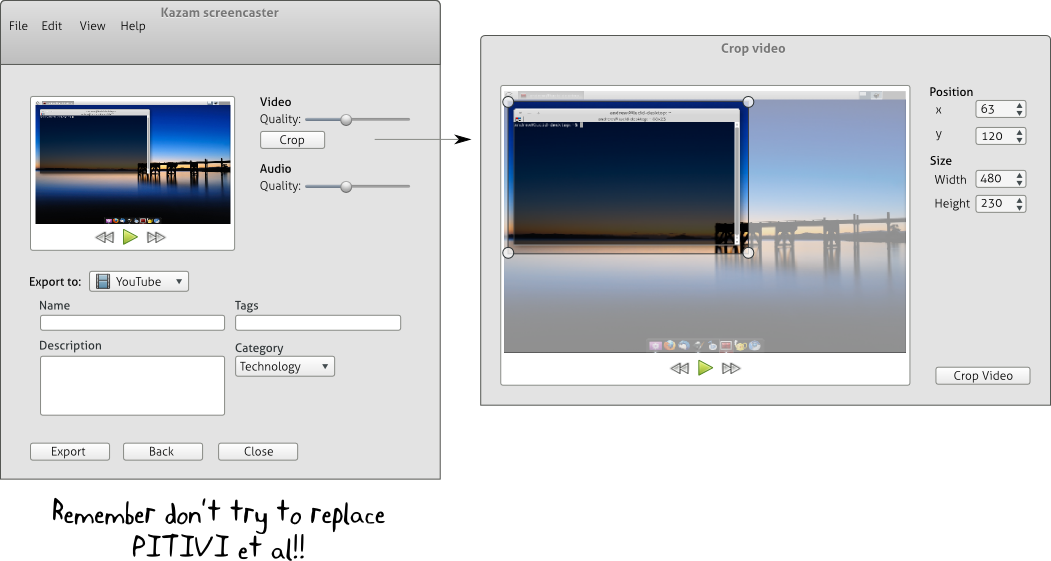


The entire post is well reasoned and food for thought so go check it out and if you're at all interested in making Kazam the killer screencast tool it promises to be then lend a hand!

Continue reading

OpenShot adds 3D animated Titling

View Comments

OpenShot development has been a wee quiet of late - bar the OpenShot survey conducted a few months back.

That silence is over with today’s announcement by lead OpenShot developer Jonathan Thomas that OpenShot will be adding animated 3D titling to it’s roster of already impressive features.Making use of Blender templates - the popular and open source 3D graphics programme - OpenShot is able to “bring the power of Blender, the creativity of the Blender community (in the form of templates) to OpenShot in the most intuitive interface possible.”

Differences

On adding the feature Thomas says: “Hopefully this feature (along with a few more we are working on) will start to differentiate OpenShot from the pack of FOSS video editors.”

After the results of the OpenShot survey threw up some rather meek and superfluous results (DVD creation & video conversion ) I am pleased to see that OpenShot is still able to take the lead and continue to provide useful video-editing features to what is, without a doubt, the premier end-user video editor for Linux.

Image: Jonathan Thomas

Continue reading

Lombard & Fillmore; 2 new video & audio editing apps released

View Comments

The company behind Ubuntu 10.10’s default photo management application ‘Shotwell’ have today announced the immediate availability of two new multimedia applications: a video editor and an audio editor.

From Yorba themselves: -

Fillmore is an open-source multi-track audio editor for Gnome, based upon GStreamer and written in Vala.  You can record one mono track at a time.  You can create multiple tracks and sequence your audio to create songs, podcasts, stories.  You can export your project to an Ogg-Vorbis file. Fillmore

Lombard is an open-source video editor for Gnome, based upon GStreamer and written in Vala.  You can import and arrange your video clips using Lombard.  If you would like to add extra audio tracks for music or voice overs, open up your Lombard project in Fillmore.Easily import your photos

Both applications are still quite young but designed to be simple, stable and straightforward to use - much like Shotwell.

Whilst neither of these applications are feature-comparable to, say, OpenShot, PiTiVi or Jokosher they are a commendable first foot forward. Both have been in development for a little while now and are backed by a company that has built up a solid reputation with the excellent Shotwell.

I’ll certainly be continuing to keep my eyes on these…

Download

There are currently no distro-specific binaries available to installed from, but concise instructions on installing from source are given on the respective project pages below. I would fully expect both of these applications to arrive in the Yorba PPA at some point in the not-to-distant future.

Continue reading

Oscar winning video editor goes open-source

View Comments

Oscar and Emmy award-winning editing software 'Lightworks is going open-source.

EditShare, the company behind Lightworks, see open-sourcing the editing application as a way to “…release its full potential...“’

Developers, aside from being able to enhance, build on and add to Lightworks, will also be able to sell their Lightworks plug-ins, etc through a centralized Lightworks online marketplace.

image

“Lightworks offers intuitive controls, advanced real time effects, 2K native support with DPX or RED, and multi-camera editing features that remain unmatched.”

Features

Lightworks currently packs in an impressive feature set, supporting resolution and codec independent edits, unlimited multi-cam editing, a slew of professional effects – including outputting them in real-time at both SD, HD and 2K resolutions (!), support for 3rd party effects, an amazing voice over tool (which I used at University!) and, well, a TONNE more besides.

Check out LightWorks full spec list @ this link

Download

The project has only just been announced as open-source – so there are no downloads to be had just yet.

A freely downloadable version is scheduled to be available by Q3 of this year.

Get involved

Developers wishing to get involved in the open-sourcing of the project can see here.

Thanks to walo

Continue reading

OpenShot 1.0 Stable Released; Best Linux Video Editor

View Comments
Video Editor OpenShot announced the release of it's seminal version 1.0 earlier today packing in so many new features, improvements and bug fixes I'm not sure I'll be able to mention them all!
The full list of new features can be found in the official OpenShot announcement, however here is a quick "summing up", giving you an over-view of some of the new features in OpenShot 1.0.
  • Stable as a house - OpenShot themselves say "Just try and crash OpenShot now. We dare you."
  • 28 new video transitions
  • 29 new titles in both 4:3 and 16:9 ratios
  • Two new themes for OpenShot itself including a 'simple' theme and a non-glossy blue one
  • New Languages
  • Help Manual integration
  • Chroma Key fixed
Take a peek at OpenShot in action: -

Any regular reader to OMG! will know that OpenShot Video Editor is a firm favourite of ours, so we congratulate the OpenShot developers for yet another awesome release.

The release of OpenShot 1.0 has truly raised the bar for Desktop Video Editing on Linux.
Download
OpenShot 1.0 can be downloaded using the instructions on the official site @ openshotvideo.com/download

Continue reading

VLC Video Editor In Action [Video]

View Comments

Despite not being able to get the ruddy thing to compile, VLMC has attracted a lot of interest since we first published the news yesterday.

The VLMC team appear to have a YouTube channel with this self-described demo video on it. The application in the video is the real deal, so take a peek at what is sure to become one of 2010’s most talked about applications!: -

(thanks for the find Conor!)

Continue reading

VLC Team To Launch Video Editor

View Comments


The people behind one of the most widely used cross-platform applications ever known to man - VLC - are due to formally announce the addition of a new project to their already impressive roster - the perhaps-not-so-snappily-titled "VideoLAN Movie Creator" (VLMC).

Aiming to do for pro-sumer video editing what VLC did for media playback, the project will support all three main OSes, use the QT framework (as VLC does) and no doubt strive to provide a comfortable and competent application.

VLMC is available to test right now using git://github.com/VLMC/vlmc.git

Sadly I've yet to get the ruddy thing to compile (One keeps getting hit over the head with "‘uint32_t’ has not been declared" errors. Bite me!) but the VLMC website states that a pre-release version will be winging its way out of the barn very shortly!

Video editors for Linux are like buses – you wait ages for one and then loads turn up one behind the other!*

(*this may be a British saying so it’s okay to be confused!)

Thanks to Resu

Continue reading

PiTiVi On Course To Become A Default Application In Lucid

0 comments
UDS Wednesday kicked off with a super interesting session; a meeting entitled "Application selection in the default install". 

Over three posts I'll present the main ideas and discussions from these meetings: Whittling the default game selection down, removing GIMP from default installs & what best to use for photo-editing and the decision to potentially include PiTiVi as a default application in Lucid Lynx...

Remember that nothing is final and decisions may change over the course of the development cycle.


Open-source video editor PiTiVi is on course to become a default application in Ubuntu Lucid Lynx, as has been proposed at UDS09.


Ubuntu gaining a video editor is a wise decision. Windows has one, OS X has one and so should Linux. Not to follow their lead but to give users what they have come to expect from a modern desktop operating system.


Sadly the decision has been taken to 'trial' PiTiVi as the video editor in Lucid, and depending on its progress during the development cycle, decide on if it should stay.


PiTiVi = Wrong move.
PiTiVi is deemed "a good and usable choice" for two reasons: -
  • It has a simple interface
  • The company funding PiTiVi, Collabora, are "pushing for it to be included" in Ubuntu. (This quote has since reworded to 'Supportive of it being included in Ubuntu' in the blueprint spec.)
The first issue is a sound one. PiTiVi follows the same "UI" as Windows Movie Maker and closesly resembles other Non-Linear editors.


PiTiVi also uses the Gstreamer framework for its decoding and encoding and as such is the closest thing to a 'native gnome' video editor.


Why It Sucks
PiTiVi can't currently handle a bunch of input formats,  including, for most people i know, a rather crucial one: DV. This was considered irrelevant at the meeting as most people, apparently, use videos from flip-cams. (Source, guys?) Most flip-cam's i've used encode to MP4 which isn't a format enabled by default in Ubuntu. PiTiVi has an issue with MP4, too...


If you use .ogg though you're away!


Half-baked
I used to love PiTiVi but its development is slower than slow. For it to be included in Ubuntu by default, and for the GIMP to be removed, will send a wrong first impression to users; Presenting them with a half-baked video editor that, lets be honest, can't do much aside from trimming and arranging. Is that a good initial impression? Do we really want to give users a video editor which doesn't match even the basic-of-the-basic video editors available for Windows?


Give it a shot
Open-Shot is the daddy of video editors on Linux. It can handle green-screen, pretty much every format you chuck at it, you can apply effects and transitions to clips, easily output video into a number of formats using its simple preset menu, or get down and dirty with specifics using the advanced version.


It has good support and fast development.


The reasons why OpenShot isn't a contender is because (quotes from the meeting): -
  • "It has serious UI problems"
  • "Its GNOME integration is awful"
  • "it has issues"
The UI has problems? Compare OpenShot & PiTiVi: -


They look the same!


Gnome Integration is awful? I can drag and drop to both... What more integration does one need in a video editor? 


As for the unspecified "issues" OpenShot has, i'd say PiTiVi has a greater share to worry about...


Regardless of what is included as default, both are useful applications. 


From what i gathered at the end of the meeting, PiTiVi is to be chosen and trialled. It will be reviewed around Alpha 2 and asked "is it worth it?". 


I just fear Lucid is shaping up to be a watered down example of a Linux desktop.

Continue reading

Openshot Video Editor Gets HUGE Update - 30 New Effects, Preview Window, Green Screen, PPA...

View Comments
OpenShot - one of the best video editor available for Linux - finally has a PPA! That's news enough in-itself as it means pain free installation but the even better news is it now comes complete with effects!


New Effects

30 awesome video effects are now included - including Chroma Key (green screen) allowing you to create all sorts of awesome videos. These are in addition to the 15+ transitions included!

The new effects include: -
  • Black and White
  • Blur
  • Glow
  • Mirror
  • Old Grain
  • Pixelate
  • Water
  • Sepia
3 new audio effects make it into the latest release, too: -
  • Phaser
  • Pitch
  • Echo
And in the spirit of OpenShot, it's as easy as dragging and dropping an effect on a clip.

PPA

You can install PPA in Jaunty and Karmic using the following official PPA: -

Ubuntu 9.04 (Jaunty)
deb http://ppa.launchpad.net/openshot.developers/ppa/ubuntu jaunty main
deb-src http://ppa.launchpad.net/openshot.developers/ppa/ubuntu jaunty main
GPG Key: sudo apt-key adv --keyserver keyserver.ubuntu.com --recv-keys B9BA26FA

Ubuntu 9.10 (Karmic)

sudo add-apt-repository ppa:openshot.developers
The PPA also contains the latest versions of all necessary dependencies that OpenShot requires - such as FFmpeg, MLT, Frei0r, and x264 so no worries about not being able to run it!


WARNING: Currently installing OpenShot via PPA will break video playback. You are advised to use the .deb's from the official site or follow the advice here.

Installation

Once you've added the PPa you can install it via Add/Remove or Software Centre or via the terminal using: -
  • sudo apt-get install openshot
Ibex or Hardy users can grab pre-made .deb's @ http://www.openshotvideo.com/download.html


Thoughts

So far testing the new version of OpenShot in Karmic I've found it to freeze up a lot so karmic users be warned. Other wise it's the same awesome quality I've come to expect from the OpenShot team who, let's face it, have created the de facto video editor for Linux. OpenShot is to Linux what iMovie is to OS X.
"OpenShot Is The De-Facto Video Editor For Linux."
PiTiVi is another popular video editor that has a lot of potential but as OpenShot point out in their announcement, despite PiTiVi having full time paid developers it's progress is incredibly slow. It lacks most of the important user-end features that OpenShot has - effects, titles, transitions...

Be sure to check out the following official demo video!


OpenShot Video Gets Effects!!! from Jonathan Thomas on Vimeo.

Continue reading

New Video Editor For Ubuntu

View Comments

OpenShot is an new non-linear video editor similar in feature set to ‘Windows Movie Maker’ or Apple’s ‘iMovie’.

Although currently in development, the latest release is surprisingly stable and comes with a raft of features and options sorely missing from most other Linux video editors, all tucked up in an easy-to-use interface!

screenshot_017

Continue reading

Top 5 Apps Not Installed With Ubuntu

7 comments
There are some incredibly useful applications that don't ship with Ubuntu one for reason or another. Below i list my top 5 of the best applications you might be missing out on!

Pitivi - Simple Video Editor (like: iMovie, Windows Movie Maker)

Pitivi is a clean, user-friendly video editor along the lines of Microsoft's Movie Maker. Although Pitivi is still very much in active development (and thus a few things haven't been implemented yet) it does already have a stable release that covers basic video editing needs.

Hopefully at some point Pitivi will be bundled with Gnome as many end users now expect some form of basic video application to ship with their OS, and pitivi does fulfill this requirement.

Find it in Add/Remove by searching for 'Pitivi'


Cheese Webcam Booth - Take Photos Using Your Webcam (Like: iBooth)

I will happily admit this one isn't quite an essential, but it is fun!

Cheese Webcam Booth lets you take photos with your webcam, apply effects to them and upload them direct to Flickr.

Handy for taking an IM avatar or just plain old showing off.

Find it in Add/Remove by searching for 'Cheese'.'


Google Earth and Google Picasa - Useful (yet fun) applications!

These two Google products are both so different, yet both so great.

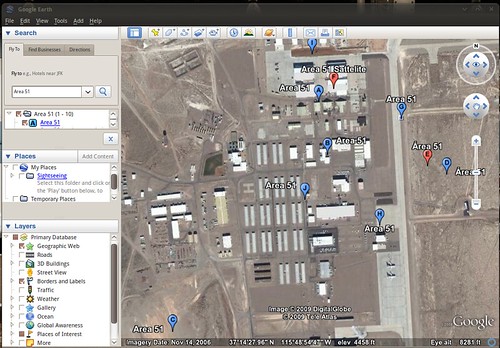
Google Earth "..lets you fly anywhere on Earth to view satellite imagery, maps, terrain, 3D buildings, from galaxies in outer space to the canyons of the ocean..". It's one of those application that you'll end up engrossed in. The animations are just as smooth as on the Windows and Mac versions, and boasts every single feature you'd find in those also.


(Be sure to follow my tip for getting Google Earth to user your desktop theme!)

Google Picasa is an excellent free photo manager and photo editor that is very, very similar to OS X's 'iPhoto'. It allows you organize, tag and sort your photos, as well as edit them (Auto-Contrast, Auto-Balance, red eye, brightness, auto-tone, etc, etc) and apply all sorts of effects (Black and White, sepia, saturate, crop, straighten, etc).


Google Earth: http://earth.google.co.uk/intl/en_uk/download-earth.html
Google Picasa: http://picasa.google.co.uk/linux/

Jokosher - Easy, User-Friendly Podcast maker (Almost like: Garagband)

For a capable multi-track recording application, look no further than Jokosher.

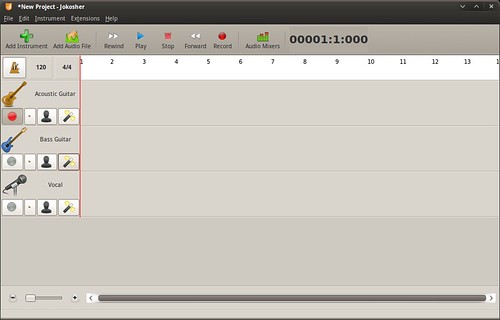
Jokosher is not only a complete application for recording, editing, mixing and exporting audio - it's UI has been designed with total usability in mind. As such you'd be forgiving for thinking it was designed by Apple!

"The developers behind Jokosher have re-thought audio production at every level, and created something devilishly simple to use."


Install it now via Add/Remove

Almost Made The List: -
Record My Desktop -
Awesome screen-capture tool
Skype -
Make free VoIP Calls
Screenlets -
Wide range of useful desktop widgets
Songbird -
Very 'iTunes' like media player
SecondLife -
3-D Virtual World

Continue reading

OMG! IRC!

OMG! IRC!
 

Popular Threads

Powered by Disqus

Designed on

Blog Archive

Recent Comments

© Ohso 2010 All rights reserved | Site designed by Jeff V and TSM1428. Created by d0od | Back To Top