

Pitivi - Simple Video Editor (like: iMovie, Windows Movie Maker)
Pitivi is a clean, user-friendly video editor along the lines of Microsoft's Movie Maker. Although Pitivi is still very much in active development (and thus a few things haven't been implemented yet) it does already have a stable release that covers basic video editing needs.Hopefully at some point Pitivi will be bundled with Gnome as many end users now expect some form of basic video application to ship with their OS, and pitivi does fulfill this requirement.
Find it in Add/Remove by searching for 'Pitivi'

Cheese Webcam Booth - Take Photos Using Your Webcam (Like: iBooth)
I will happily admit this one isn't quite an essential, but it is fun!Cheese Webcam Booth lets you take photos with your webcam, apply effects to them and upload them direct to Flickr.
Handy for taking an IM avatar or just plain old showing off.
Find it in Add/Remove by searching for 'Cheese'.'

Google Earth and Google Picasa - Useful (yet fun) applications!
These two Google products are both so different, yet both so great.Google Earth "..lets you fly anywhere on Earth to view satellite imagery, maps, terrain, 3D buildings, from galaxies in outer space to the canyons of the ocean..". It's one of those application that you'll end up engrossed in. The animations are just as smooth as on the Windows and Mac versions, and boasts every single feature you'd find in those also.
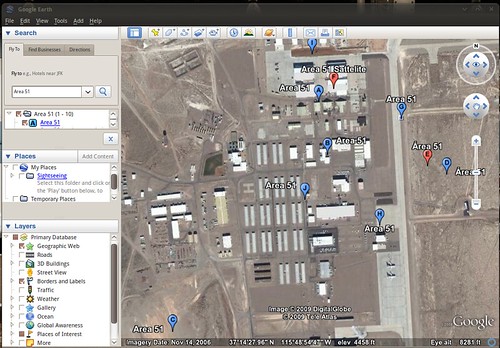
(Be sure to follow my tip for getting Google Earth to user your desktop theme!)
Google Picasa is an excellent free photo manager and photo editor that is very, very similar to OS X's 'iPhoto'. It allows you organize, tag and sort your photos, as well as edit them (Auto-Contrast, Auto-Balance, red eye, brightness, auto-tone, etc, etc) and apply all sorts of effects (Black and White, sepia, saturate, crop, straighten, etc).


Google Earth: http://earth.google.co.uk/intl/en_uk/download-earth.html
Google Picasa: http://picasa.google.co.uk/linux/
Jokosher - Easy, User-Friendly Podcast maker (Almost like: Garagband)
For a capable multi-track recording application, look no further than Jokosher.Jokosher is not only a complete application for recording, editing, mixing and exporting audio - it's UI has been designed with total usability in mind. As such you'd be forgiving for thinking it was designed by Apple!
"The developers behind Jokosher have re-thought audio production at every level, and created something devilishly simple to use."
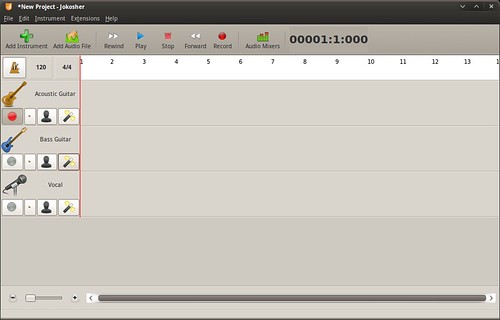
Install it now via Add/Remove
Almost Made The List: -
Record My Desktop - Awesome screen-capture tool
Skype - Make free VoIP Calls
Screenlets - Wide range of useful desktop widgets
Songbird - Very 'iTunes' like media player
SecondLife - 3-D Virtual World


7 comments:
Thanks for the tip about pitivi. I have been looking for a simple video editor along the likes of Windows Movie Maker and haven't found anything that simple yet until now.
Thanks.
Thanks for your recommendations.
Here is what I would like to recommend:
1) audacious (winamp like music player);
2) midori (lightweight web browser, latest version can be installed from:
launchpad.net/~midori/+archive/ppa )
3) gnome-do
4) gnome-mplayer
5) avant-window-navigator
6) claws-mail
7) Geany IDE
8) notecase
9) tasque
Haha! Tomas, awesome list! You have some applications in your top 10 that i wrestled about including in my list!
O/T:
Midori is an interesting browser, but i don't feel it offers anything over epiphany webkit - especially for Gnome users for home epiphany is 'more at home'.
I, too, install Gnome-Mplayer. In fact i did a post about it a few months back!
Great list -- to tell the truth, when I first saw Cheese, I couldn't see the point, but it's come in surprisingly useful.
Continuing the O/T:
I like the Preferences dialog in Midori -- it's very configurable and well-organized.
But I must admit I normally use Firefox, as there are extensions to kill the menu bar (great for netbooks!).
Most people would not need them which is why they do not rate to be on Ubuntu disk.
GoogleEarth and Cheese are the only two that I would use. GoogleEarth is undeserving because it is has a EULA.
Cheese alone deserves to be included as worthy of being on the disk, but it is only useful for people with web cams.
Seriously, how many people podcast or edit videos?
@Joey
I haven't used epiphany lately, but I don't think it offers:
1) undo close tab;
2) Easily accessible search engines (say you can assign a to anidb, i to imdb and do searches by typing, let's say, "a monster" or "i beautiful mind" in location entry);
3) transferbar;
4) session saving;
5) bookmarkbar.
@LinuxCanuck - that's the point of this list; these are applications that aren't included in Ubuntu but lots of people use. I didn't say they should be included just they're applications that i always install after a fresh-install.
As for video editing - many people video edit, but it's more of the case that both Windows OS and OS X ship with video editors, yet Ubuntu doesn't. Many people make YouTube videos etc that require a bit of basic editing, or make a slideshow with some music etc - pitivi fills this void admirably.
Post a Comment