Showing posts with label uds-m. Show all posts

What it's like at UDS, video

View Comments

What's it like at an Ubuntu Developer Summit? Luckily I got a hold of a high definition Canonical video camera thanks to Amber Graner and the folks doing the video stuff for UDS. Let me show you what UDS is like.


Direct (.avi) download: http://www.sendspace.com/file/i5gpm9

The song is "Time to Pretend" by MGMT off their album, Oracular Spectacular.

Continue reading

Next-gen file system May be default in UBuntu 10.10

View Comments
Scott James Remnant of the Ubuntu Foundations team has mentioned that the next-generation BTRFS filesystem could very well be the default filesystem for Maverick installs, stating in his blog post: -

“We are going to be doing the work to have btrfs as an installation option, and we have not ruled out making it the default.”

He does go on to list a number of caveats associated with taking such a decision meaning a hard slog will be required to head towards the goal – but it certainly doesn’t seem out of the ball park.

The current default filesystem is EXT4, the lead developer of which has previously called a ‘stopgap’ towards BTRFS.

Continue reading

Rekonq to be Kubuntu 10.10's default browser

View Comments
We're hearing that Kubuntu 10.10 will see Rekonq installed as the default browser.
Features
Rekonq may not have a plugin library but it does have AdBlock support baked in the application itself. It also boast a really impressive semi-tabbed 'start page' speed-dial with four separate views (Favourites, Closed tabs. Bookmarks and History)

It's light, fast and compatible with most websites due its webkit base.

Install
Ubuntu users curious to see what Rekonq has to offer can install it from the Software Centre or click the apt:url blow.

[install rekonq]

Continue reading

Jorge Castro acts like a dork; demos U1MS beer

View Comments
There are no words to describe this.

Continue reading

Ubuntu 10.10 Application Lineup sees no major changes

View Comments
The desktop application selection for Ubuntu 10.10 was discussed in-depth this afternoon at UDS and, image application aside, there will be no major changes to the set of applications shipped by default

Ubuntu 10.10 App Line-up
  • Rhythmbox will remain the default music player for Maverick
  • Shotwell replaces F-Spot
  • Firefox will remain the default browser but Chromium will be supported like a "first class citizen". 
  • Tomboy and Evolution will remain
  • The game line-up may see a new addition - though the specifics of this will be revealed in due course. The other games will remain.
  • No change to OpenOffice

Continue reading

See Ya F-Spot! Shotwell to be default Image App in Ubuntu 10.10

View Comments
Although F-Spot currently maintains the comfortable position as the default image management and editing application in Ubuntu 10.04, Maverick will see the much-derided application dethroned in favour of photo management application Shotwell.

The decision, confirmed at the Ubuntu Developer Summit, had long been mooted. 

What's Shotwell? 
The developers describe it as: -

"...a digital photo organizer designed for the GNOME desktop environment. It allows you to import photos from disk or camera, organize them in various ways, view them in full-window or full-screen mode, and export them to share with others."


Navigation
Like F-Spot Shotwell has an easy to navigate interface and both applications have many similar features such as Slideshow, tags, image editing, etc.

Where both applications differ is on the way they manage photos and, perhaps more importantly to some, resource usage: With a library of 50 photos F-Spot used 40MiB of RAM whereas Shotwell used just 15MiB.

Shotwell can export photos in-app to popular photo sharing services such as Flickr, Facebook and Picasa.


Shotwell: Interface
The left-hand pane in the main window lists two entries for viewing your digital image library: 'Photos' and 'Events'. When tags are applied to photos a 'tags' entry will also display in the sidebar.


The default view is 'Photos' which displays all of the photos in your library. 'Events' groups photos by date, although you can rename the 'date' to something more descriptive such as 'Sally Sue's Party' and, if applicable, 'tags' allows you to sort through photos by tags.

Editing
Shotwell also comes with a fantastic set of editing tools ranging from crop, auto-adjust, exposure, temperature, mirror and rotate.


Links:
Shotwell homepage: http://yorba.org/shotwell/
Shotwell Flickr group: http://www.flickr.com/groups/shotwell

Continue reading

UDS-M: Ubuntu 10.10 Netbook Edition default applications: No significant change from Lucid

View Comments
image

The Default Application Selection for Ubuntu 10.10 Netbook edition was today discussed at the Ubuntu Developer Summit in Belgium - and threw up a few surprises!
  • Chromium is to become the default browser for Ubuntu Netbook Edition - at least until Alpha 3!
  • Evolution Express - the successor to the Anjal interface - was seriously considered for inclusion. Final decision rejected this in favour of Evolution with a few tweaks.
  • OpenOffice remains the default office software, although Zoho webapps got an honourable mention.
  • 'Megoo Media Player' (formerly known as 'Cubano' for Banshee), XBMC & Moovida were all suggested as media player replacements for the Netbook edition. Issues were raised about ensuring the UbuntuOne Music Store works for users, with no formal decision made. Meego certainly sits as the front-runner in this case, but only testing, evaluation and time will tell...
  • The image application will be the same as that of the desktop, most likely Shotwell.

    Continue reading

    UDS-M: Chromium to be default browser in Ubuntu 10.10 Netbook Edition

    View Comments
    The Opensource Chromium browser - the base behind Google Chrome - will be the default browser in Ubuntu 10.10 Maverick Netbook Edition - at least until Alpha 3!

    Speed
    The decision, taken today in the Default Netbook App Selection session at the Ubuntu Developer Summit, was based on a variety of reasons not least of which favoured the good code base, upstream maintainance and the browser speed. The wide plugin base and the flexibility of webkit were also seen as plus.

    Concerns
    Issues raised concerning Chromium's non-native look, lack of support for native scrollbars and issues with printing will lead the Netbook team to decide, by Alpha 3, whether or not it will remain default for the full cycle. One area that will certainly need consideration will be compatability with the new global menu bar coming in the netbook edition.

    During the discussion other alternative browsers mooted were Midori - which was praised for its speed and active development but untimely rejected due to lack of user awareness and the surging popularity of Chromium.

    Continue reading

    UDS-M: Ubuntu Netbook Edition global menu is going to rock; demonstration

    View Comments
    There were a couple of UDS sessions today that covered the new global menu for Ubuntu 10.10 Maverick Netbook Edition. It was decided that the global menu will be tested in Maverick Netbook Edition and a PPA will be available for Lucid users to help test as well. During the first testing phase, both the menu in the panel and the menu in the window will be visible so testers can ensure they are the same - that the right information is getting parsed through to the panel.

    After alpha 2 of Maverick, the window menu will disappear and only the global menu will be available. During this time work will be ongoing to fix applications that don't work too well with the new menu.

    A lot of people have thought this would only be for GNOME, and only for GTK. In a session today at 5pm local time, there was a demonstration that shows the technology working in Qt and GTK across GNOME as well as KDE.

    Remember, this technology will only be present by default in Ubuntu Netbook Edition, but desktop users will be able to easily install it too.

    Note that the video is still being processed.

    Continue reading

    UDS-M: Sound menu Changes coming In Ubuntu Maverick

    View Comments
    Ubuntu 10.10 will see the introduction of a ‘unified sound menu’, designed to allow users to easily control music playback and control over-all sound volume; staking itself on more than just managing volume, but managing applications that use the sound menu.

    The menu will act as a “remote control” for Rhythmbox  allowing users to change track, start playlists and display artwork, although it allows for any music player to use it.

    VoIP applications will also see themselves well served by the new menu with handy sliders for Microphone/input volume and automated fade in/fade out of music upon received call.

    It’s also worth noting that whilst the default music player for Ubuntu has yet to be decided on, Banshee, in addition to Rhythmbox, is being sought to be compatible with the new menu.

    image
    Picture: MPT

    Continue reading

    UDS-M: Me Menu getting improvements for Maverick

    View Comments
    The Me Menu in Ubuntu 10.04 is getting much needed improvements for Ubuntu 10.10 based on user feedback and research conducted recently.

    Some new features and bug fixes planned from the UDS session:
    • Notifications to confirm that your broadcast message has been sent
    • A label for the text field to make it more obvious what it does
    • Character counter for the text field
    • Faster synchronization with Gwibber updating new information
    • A better word instead of "Broadcast" for the Broadcast accounts option
    • Buttons to select which accounts you would like to post the message to as per the original design:-

      Continue reading

      Tyler on Ubuntu: Why Netbooks are bringing the future

      View Comments

      In case you've  been hiding under a rock, or hang around people who exclusively use Mac hardware, then you've witnessed the explosion of the Netbook. Small, light, less then 10 inches, and with impressive levels of battery life, netbooks have gone from toy to everywhere in 2 years, and have now settled into an area somewhere between secondary computer and primary net device for many people. They're cheap, they're portable, they can very nearly be given as gifts and many schools, such as my own, have handed them out like candy.

      The real trick, though, was to get the perfect balance of hardware and software so that they actually mattered. To get something so small with enough battery to make them worthwhile, you really have to hit a home run with the software. Many of the first generation, and  some of the more clueless manufacturers still do this, simply shipped windows on the netbook, so what you get is a very slow, really small windows laptop. Even still, people have estimated 90% of netbooks still use XP. However, it is estimated that 32% of laptops shipped since November 2009 run customized Linux of some form, and Ubuntu Netbook Edition is one of the most used OS's available (Yes, those statistics are from Wikipedia).

      UNE has already made great strides. Working off the model Moblin established in '07, UNE has been consistently doing something that has stagnated on the common Ubuntu desktop: Innovate. Something about the combination of the cheap computer, small screen, and tiny trackpad has given people the ability to release control of their desktop just enough for a complete change to take place, a change which has been steadily pushing its way to the common mix of Ubuntu over the last 2 years. Much of Ayatana's work has been under the label of 'Saving vertical screen space for netbook users' and much of what we will continue to see will fall under this header.


      Unity


      And we've seen it happen yet again. Mark Shuttleworth's announcement of the new "Unity" interface for UNE has shown something we should have noticed for months now. Ubuntu is working on the interface for Netbooks far more then for non-Netbooks. Partly, this is just the nature of the netbook. Anything done to improve the standard desktop will float downstream to the netbook interface eventually, but its more then that. The netbook is the testing ground, the place for new things to happen. The newness of the device means the newness of possibilities, and if I got one message from Mark's address, it was "Lets conquer this device." How many of the last few Ubuntu announcements been entirely Netbook oriented? Since Mark announced Maverick Meerkat, every announcement has either been entirely or at least half and half Netbook oriented. Its clear that this is important to them, and I think it should be made clear to Ubuntu users that this is the direction we are moving in: fast, User-data oriented, and internet focused.

      Not only that, but the new Network Connections menu is UNE only, the recently announced global menu is UNE only, their new launcher... the new things are UNE oriented, almost in entirety, and the only love for the common desktop is the overlap between the two.


      What does that mean for 10.10?


      Well, first of all, I think theres something extremely telling although not mentioned directly in Marks announcement. In the Official screenshots, Firefox is still the browser, but in Mark's personal screenshots, we see Chromium. Don't be surprised to see Chromium become official sometime in the next year and a half, at least for the Netbook edition. Now, I didn't say expect it, I said don't be surprised. Don't misquote me. :D

      Secondly, don't expect gnome-shell to find a permanent home any time soon. Unity has apparently been worked on for longer then gnome-shell, as Mark said on his blog. Why is this important? It means that Ubuntu has their own panel and their own launcher, which may well be based in gnome, but could very easily be brought up to snuff as a whole before development for current Gnome ceases. While gnome-shell will be apparently packaged as an option in Ubuntu, I think its more likely that we'll see a slightly altered version of the netbook panel and launcher far more likely.

      Third, expect more of this. If you hate the me-menu, and the announcement today about Unity, and you demand more bug fixes instead of new menus... you're going to be disappointed. Theres going to just continue to be more announcements of new panels  and new indicators and new this and new that. I personally get excited, but I know some of you guys hate it. Sorry.

      Lastly, lets hear the (constructive) feedback. If you ask me, Ubuntu has become the best desktop experience available, and the only thing that Ubuntu lacks compared to Mac and PC is professional use applications and some usability. This Netbook stuff is the foundation for pure perfect beautiful usability on the Ubuntu desktop, and you, the user, needs to speak up about the things you want. Theres plenty of stuff that I spend my time criticizing, but its by analyzing what is good and what is bad that leads to improvement. Lets speak up, and make 10.10 the best operating system it can be.

      Share your thoughts on the new Netbook announcements in the comments!

      Continue reading

      UDS-M: Design, design, design!

      View Comments

      Design. The word on everyones lips after the release of Lucid Lynx, at least around these parts!

      The Canonical design team has only been around for one year, that is, two releases. They're a very new team and they have copped perhaps the largest amount of flak from the community than any other Canonical team. But why? Many people suggest it's a lack of transparency, not communicating with the community. There has been disappointment at the breaking of UI freezes, and landing changes or releasing files a day before release. There has also been talk about controversial changes, such as the infamous window button debacle which seemingly had no reasoning at the time they were moved.

      Ivanka Majic, the Canonical design team manager, held a design team plenary in the auditorium at the Ubuntu Developer Summit where she talked about the design team as a whole, what they do and how they do it. As this is the first UDS that has a dedicated design track, many people in the community haven't had a lot to do with the design team and perhaps are unsure of their inner workings.

      Ivanka talked about some results from user research the team has been conducting, focusing on the importance of wording, as well as improving the "first use" experience.

      She went on to suggest it's the little things that count, like the Me Menu, and the Show Desktop icon.

      Unfortunately, Ivanka didn't talk about working on the design team itself, and fixing some of the issues I mentioned above. There are developments in the team in this area and they are working on collaboration with the community - with a bit of luck more will be revealed this week and you'll be the first to know!


      Continue reading

      Ubuntu Developer Summit Maverick plenary and keynote: New Ubuntu "instant on", netbook shell, more

      View Comments

      Well, here I am at the Ubuntu Developer Summit in Brussels, Belgium. Yesterday I got to head into Brussels and have a look around with a couple of Italian friends from the Italy LoCo team. But today, everyone is refreshed and ready to get some work and make Maverick the rocking release it should be.

      I'm sitting in the middle of a large auditorium listening to Jono Bacon do the introduction. I will try my best to take photos during the plenary, stick them on my computer and upload them, then post news as I hear it. You'll hear it first right here. Mark's keynote is at 10:00am Brussels time (UTC +2).


      Mark's keynote


      Read Mark's post about Unity here: http://www.markshuttleworth.com/archives/383

      9:50am - Mark takes the stage and starts talking about Lucid, congratulates everyone.

      9:53am - Some things we need to get right: OEMs, first boot experience, media and codec handling. Quality and Continuity - the core values, freedom, collaboration, precision and reliability.

      "Let's go after the WHOLE desktop market."

      We want OEMs to deliver Ubuntu as a dualboot system, research into "instant-on" systems - focus on how fast you can "deliver the web." This is called "Ubuntu Light." Audience applauses.

      Stripped down UNE and Ubuntu Desktop for the instant-on system, available to OEMs now.
      • Connected to the web in 7 seconds on SSD
      • No traditional file management
      • Small set of default apps: browser, media, mail
      • Focus on touch
      Will be able to change to any version of Ubuntu, easily using apt-get. Initially could be a small set of applications on UNE - focus on the web, huge focus on the touch.

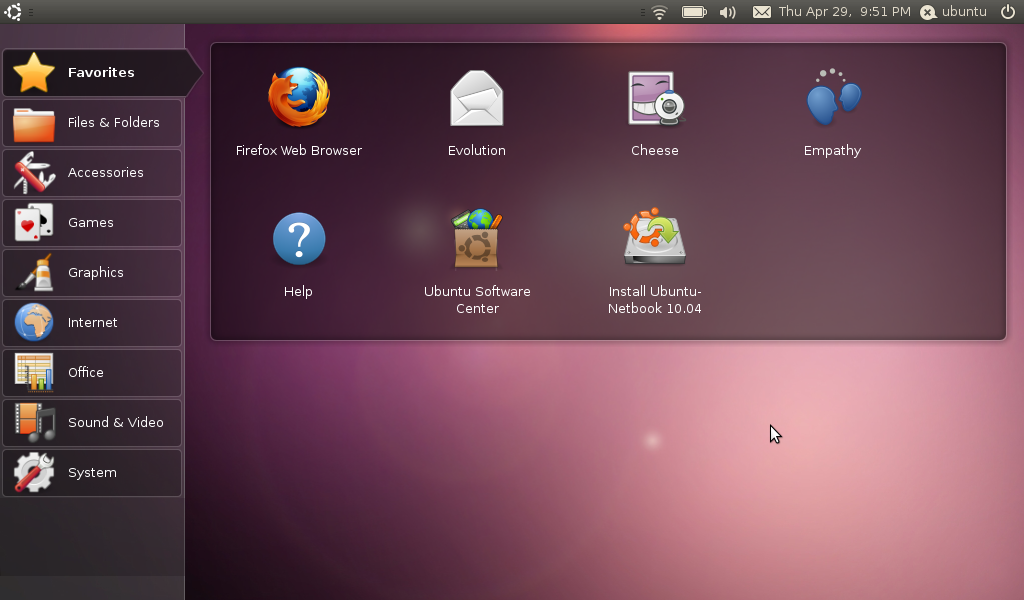
      10:00am - "Unity" for Ubuntu Netbook Edition - a new menu, a new launcher, new panel.


      YOU CAN DOWNLOAD UNITY:
      • ppa:canonical-dx-team/une
      • apt-get install unity
      • Choose the Unity session at GDM login.
      Unity will use Clutter, a panel with ayatana indicator support and a launcher with "QuickMenu" and "Reveal."

      10:05am - "Unity - Canonical's Netbook Shell." Unity should be "absolutely nailed down" for 12.04 LTS. Mark hopes that freedesktop.org adopts these as they stabilize.

      Gnome-Shell will be packaged in 10.10, but it will not be default for Maverick.

      Client-side decoration and RGBA will be landed early in the 10.10 cycle. "We want to make sure that every application has full alpha channel support."

      10.06am - The sound indicator. Focus on consistency. The music player can add features, items to the sound indicator. It's "extensible." If the application doesn't support the new indicators, it will fall back to a different technology.


      The keyboard menu, the clock menu, the network menu:


      10:13am - Window indicators. The indicators behave "exactly like status indicators" - clicking on them gives you a menu. They're broadcast over D-Bus, either the window manager or the panel can take control over the rendering of the indicators, also so it works with multiple window managers - client side, Compiz, Metacity etc.

      10:14am - The global menu on Ubuntu Netbook Edition. Browsing the web, maximizing vertical space, removing the bottom panel. "Lightweight" browsing experience.

      We will have "the best platform for browsing on a netbook."

      The perfect 10.10:
      • Unity in UNE
      • Font
      • Icons
      • Lots of new desktop technologies...
      Font beta program will be open soon. (It's actually finished, but is undergoing fine tuning - it's on all the material around the hotel including the slides, booklets and things and also our name tags.)

      101010 = 42!


      Mark wants Maverick to be launched on the 10th October, 2010. (Which is a Sunday!!)

      *Some hilarious jokes about shiny bald track leads*

      "A once in a century opportunity."

      10:21am - Mark ends the keynote with "So long, and thanks for all the frite."

      10:22am - Mark shows us Unity actually running on his laptop:


      Question from Martin Owens about whether the dual-boot OEM will be for netbook or desktop, or both. Mark responds that they will offer "Ubuntu Light" for the desktop in the future, but emphasis is on the netbook interface for now.

      Somebody asks about advertising Ubuntu, looks like there are no plans for the moment to actually advertise Ubuntu across traditional media. Mark uses the Ubuntu Manual as an example of how Ubuntu gets advertised and will reach the mainstream, Mark points out myself and the room applauds the Ubuntu Manual Project! Woohoo!

      Continue reading

      OMG! IRC!

      OMG! IRC!
       

      Popular Threads

      Powered by Disqus

      Designed on

      Blog Archive

      Recent Comments

      © Ohso 2010 All rights reserved | Site designed by Jeff V and TSM1428. Created by d0od | Back To Top